
Pi Day for All Learners! 🥧📚✨
Pi Day is the perfect time to celebrate math, but let’s make sure everyone can enjoy it! Here are a few tips to make Pi Day more accessible for ALL learners, no matter their needs.
Showing posts with label Assistive Technology. Show all posts
Showing posts with label Assistive Technology. Show all posts
Friday, March 14, 2025
Making Pi Day Accessible


Thursday, September 29, 2022

Wednesday, January 6, 2021
Webinar Wednesday: Leveling the Playing Field: Support for Struggling Readers in a Blended Learning Environment
Leveling the Playing Field: Support for Struggling Readers in a Blended Learning Environment
Monday, January 11, 2021 @ 3:00 pm - 4:00 pm EST

Presented by Kathleen Colburn, Senior Product Manager, Read&Write; and Diana Petschauer, Managing Director and AT Consultant, Assistive Technology for Education
Sponsored by Texthelp
GET THE RECORDINGThe recording will be posted on this page after the live session. Closed captioning will be added to the recording within 2 weeks of the live presentation.
To say that things have been in flux over this past year is an understatement. The everyday learning environment has taken on a whole new meaning as you and your students have pivoted from in-person, to remote, to hybrid learning (and have sometimes bridged these gaps multiple times). Many students lost almost a full semester of learning; some lost more. And while no child has gone unaffected by these educational gaps, those who were struggling prior to school closures have been hit the hardest, further widening already-existing literacy achievement gaps. It’s now urgent that we move forward from these learning losses, and ensure that every child, especially those who struggle most, has the most essential building block for their literacy journey—a strong foundation for reading.
Join Diana Petschauer, Managing Director and AT Consultant, Assistive Technology for Education, and Texthelp’s Kathleen Colburn, Senior Product Manager, as they explore strategies and tools to empower struggling readers in a blended learning environment. During this edWebinar you will:
- Uncover best practices to motivate students to engage with reading in any environment, promoting confidence and a positive growth mindset
- Explore multiple free technologies that can help to close reading achievement gaps and work alongside students’ everyday Learning Management Systems and devices
- Take a deeper dive into Read&Write, a literacy support toolbar that can help struggling readers create and engage with content across all grade levels, subjects and interfaces (web, Google Docs, exams, and more!). Plus Read&Write is completely free for teachers.
This edWebinar will be of interest to kindergarten through middle school teachers and school and district leaders. There will be time for questions at the end of the presentation.
 About the Presenters
Kathleen Colburn is a senior product manager at Texthelp, an industry leader in literacy and STEM software. In her six years with the company, she has served in roles ranging from supporting teacher and student end users, to her current position working directly with the software development team to shape the product roadmap. Outside of her role at Texthelp, Kathleen is a Google Certified Trainer, earned her bachelor’s degree in mathematics from Tufts University, and has taught and tutored students in high school math and college entrance exam preparation.
 Diana Petschauer, M.Ed., ATP is a RESNA certified Assistive Technology Professional and Managing Director of AT for Education, ATforED.com. She manages her team of expert consultants who provide evaluations, consult and training to students and adults as well as professional development for professionals and families. Prior to ATforED, Diana was the AT specialist at UNH, supporting students transitioning to higher education with AT and accommodations. She started her career in public school special education. Diana presents often on AT and literacy intervention to provide multi-sensory support for dyslexia or LD.
Friday, May 15, 2020
Friday "Appy" Hour: App Wheel for Learners with Complex Additional Support Needs
The amazing folks at Call Scotland have recently released the latest poster in their popular 'App Wheel' series in response regular queries about useful iPad apps for complex learning difficulties. The 'Wheel of Apps' is not comprehensive, but attempts to identify relevant, useful apps and to categorize them into the areas where an iPad can be a useful tool for learning and teaching. It is important to note that some apps address a range of difficulties. The wheel features a mix of apps, some of which will be useful for using with Primary aged learners, some with Secondary aged learners and some with both.

Wednesday, January 15, 2020
Engaging Students in Reading Instruction through Educational Technology
Engaging Students in Reading Instruction through Educational Technology
Presenter: Sharon Plante, Chief Technology Integrator and Faculty Member of The Southport School
Date: Wednesday, January 22
Time: 4:00-4:20 PM
Cost: Free - Click here to register.
Description:
The utilization of technology (Interactive screens, iPads, apps, and websites) can make reading instruction (decoding/encoding, fluency, and comprehension) a multi-sensory process that is engaging and explicit while maintaining the individualization and diagnostic-prescriptive aspects of the lesson. It can support the organizational challenges for necessary lesson materials that can occur when working with multiple students at once, while also allowing for ease of differentiation within a small group format. Additionally, educational technology can provide ways for the teacher to collect work samples and data from multiple students simultaneously and allow for individualized feedback. The session will focus on the use of various tools that can support differentiated and individualized engagement during small group multi-sensory reading instruction.
The utilization of technology (Interactive screens, iPads, apps, and websites) can make reading instruction (decoding/encoding, fluency, and comprehension) a multi-sensory process that is engaging and explicit while maintaining the individualization and diagnostic-prescriptive aspects of the lesson. It can support the organizational challenges for necessary lesson materials that can occur when working with multiple students at once, while also allowing for ease of differentiation within a small group format. Additionally, educational technology can provide ways for the teacher to collect work samples and data from multiple students simultaneously and allow for individualized feedback. The session will focus on the use of various tools that can support differentiated and individualized engagement during small group multi-sensory reading instruction.
Wednesday, May 15, 2019
Webinar Wednesday: Apps, Extensions, and Tech Tools for ADHD Brains: A Learning Guide
 In this hour-long-webinar-on-demand, learn the most popular and effective technology tools for students with ADHD, with Janet DeSenzo.
Students don’t learn material that fails to engage them. Kids, especially those with unreliable attention and focus, lose interest quickly if the curriculum feels inaccessible and intangible. Many schools today are responding by using technology tools and the Universal Design for Learning approach.
Here, learn about the most popular and effective technology tools for students with ADHD and learning disabilities. Geared for educators, parents, and clinical professionals, this webinar will explain how to maximize students’ learning through the use of apps and tools for Chromebooks, iPads, Windows, and Macs. Teachers will also pick up lesson plans and strategies for incorporating technology into their UDL classrooms, and learn why educators are shifting the focus from accommodating students with ADHD to creating a more accessible, engaging curriculum.
In this webinar, you will learn about:
- Great Chrome apps and extensions for helping differently wired students
- iPads apps designed to maximize your child’s learning, plus the many tools built into the iOS operating system
- Tools offered by Microsoft that can assist with organization and productivity
- How to set up a Universal Design for Learning classroom, and how it supports all types of learners
Play this free webinar and download the slide presentation of "Apps, Extensions, and Tech Tools for ADHD Brains: A Learning Guide," plus get more strategies from ADDitude via email.
Meet the Expert Speaker:
Janet DeSenzo has been working in the field of assistive technology for more than 15 years. She started working with college students at the university level, assisting students with disabilities as the coordinator of Disability Services at a state university in New Jersey. From there, she started her own educational consulting company, JanTech Educational Services, which she still owns and operates. Janet is currently an assistive technology specialist and technology integration specialist in the Vernon Township School District of NJ. There, she helps find technology solutions for students with special needs and assists teachers with integrating technology into their everyday lessons.
Wednesday, May 8, 2019
Webinar Wednesday: Assistive Technology and the Writing Process
Writing - whether it's sentences, paragraphs, or essays - is a multistep process including brainstorming, organizing, drafting, and editing. All these tasks can pose access barriers for students with a wide range of physical, cognitive, and learning challenges. Watch the recorded webinar hosted by AT Coalition about tools and strategies to support all the steps in the writing process. To download the PDF, visit the link here!
Source: AT Coalition
Wednesday, March 27, 2019
#ATAwarenessDay
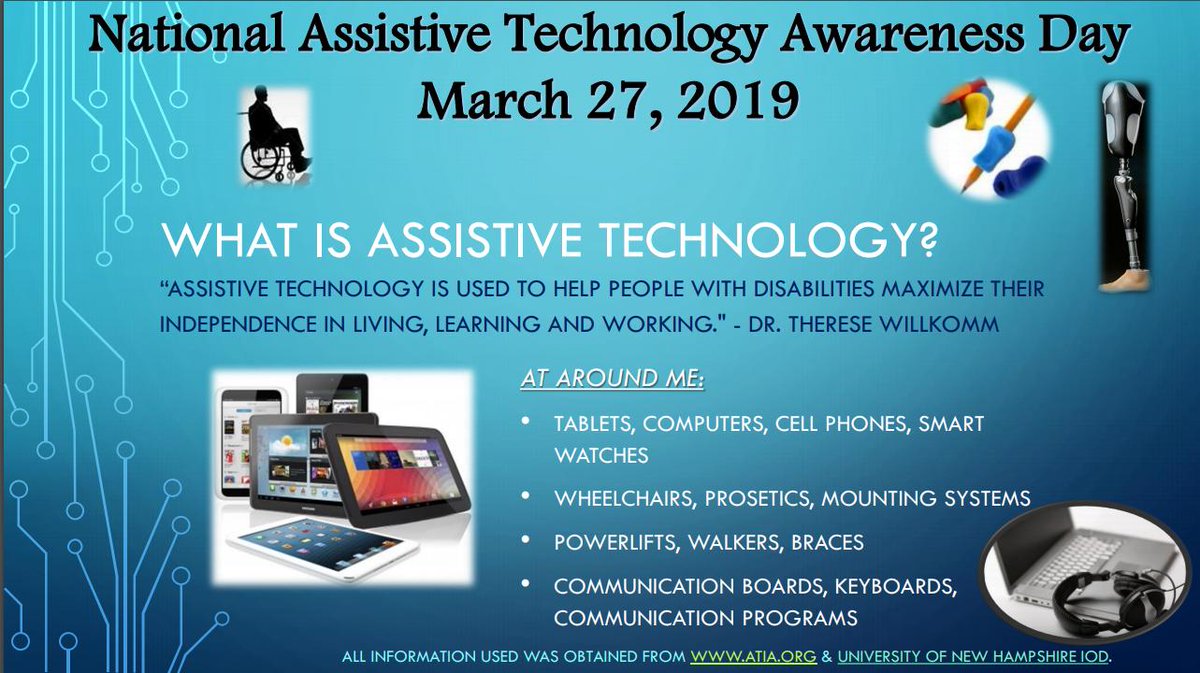
 In honor of #ATAwarenessDay, I felt it was important to take a step back to review the basics of what assistive technology is, the types/categories of technologies available, frameworks, feature matching of tools, as well as some of the important steps to follow during the selection process. Whether you're new to the field of assistive technology or more seasoned, take a peek into each of these areas. Please feel free to comment below if you have any other information you feel should be included or would like to see more of. To learn more about #ATAwarenessDay follow the hashtag on Twitter and read about Senate Resolution 103.
Visit some links and previous Where It's AT blog posts...
- Getting Started....What is Assistive Technology?
- Intro to Assistive Technology from the CTD
- Assistive Technology Checklist: What to Consider When Looking at AT
- Assistive Technology: What It Is and How It Works
- The QIAT Top 10
- Assistive Technology (AT) to Support Students with Special Needs
- 5 Low-Tech AT Options
- From High to Low to No Tech Tools
- The SETT Framework
- CTD's Assistive Technology Module
Wednesday, February 13, 2019
CTD's Assistive Technology Module
New to the field of assistive technology or looking to gain more insight? Then look no further. The incredible folks at CTD have done it again, this time providing the ultimate resource in Assistive Technology. Their training module includes guides, reference charts, vidoes and webinars. Be sure to read below and click on the hyperlinks to explore each module and resource further.
ASSISTIVE TECHNOLOGY MODULE
|

|
|

|

ASSISTIVE TECHNOLOGY MODULE
FOR PERSONNEL PREPARATION PROGRAMS
THE IMPORTANCE OF ASSISTIVE TECHNOLOGY TO STUDENTS WITH DISABILITIES: LEVELING THE PLAYING FIELD
There are more than 6.7 million students ages 3–21 who receive special education services. That represents 13 percent of all public school students. That number does not include the additional millions with undiagnosed disabilities and/or those with diagnoses who do not receive formal special education services. It also does not include students in private schools. A small percentage of these students currently have access to assistive technology (AT). A far greater number would benefit from AT if it were made available to them.
In the past, the term “assistive technology” referred to a limited range of specialized, often expensive items that were designed to help students with relatively severe disabilities perform tasks that they could not otherwise do. In recent years, developments in technology have changed all that. Assistive technology now refers to a wide range of devices, software, apps, and services that are widely available at lower cost. Many items that you might not think of as AT, are. They can be as basic as a magnifying glass or as complex as a robot. They range from no-tech, do-it-yourself items to programmable software programs that can be readily customized by a teacher, therapist, or parent.
If an item allows a student with disabilities to perform a task that he or she could not do otherwise, it can be considered assistive technology. That makes it subject to the laws governing public education, such as the Individuals with Disabilities Education Act (IDEA).
Whether you choose to teach in a public or private school, in a general or special education classroom, you will almost certainly have students in your class with a range of abilities and disabilities. Some of those students will have Individualized Education Plans (IEPs), some will not. Both groups, however, will benefit greatly from your knowledge of assistive technology devices and services.
The materials in this module, will help you:
- Understand the basic concepts underlying the use of assistive technology
- Become familiar with the words and terms associated with AT
- Understand your role as a teacher in helping to identify and integrate the use of appropriate AT in your classroom
- Learn about the laws governing AT in public schools
- Participate as a knowledgeable professional in the IEP teams to which you will be assigned
- Become a role model, peer mentor, and school leader in the use of AT
- Change the lives of students with physical, sensory, cognitive, and emotional/behavioral disabilities
TABLE OF CONTENTS
In the past, the term “assistive technology” referred to a limited range of specialized, often expensive items that were designed to help students with relatively severe disabilities perform tasks that they could not otherwise do. In recent years, developments in technology have changed all that. Assistive technology now refers to a wide range of devices, software, apps, and services that are widely available at lower cost. Many items that you might not think of as AT, are. They can be as basic as a magnifying glass or as complex as a robot. They range from no-tech, do-it-yourself items to programmable software programs that can be readily customized by a teacher, therapist, or parent.
If an item allows a student with disabilities to perform a task that he or she could not do otherwise, it can be considered assistive technology. That makes it subject to the laws governing public education, such as the Individuals with Disabilities Education Act (IDEA).
Whether you choose to teach in a public or private school, in a general or special education classroom, you will almost certainly have students in your class with a range of abilities and disabilities. Some of those students will have Individualized Education Plans (IEPs), some will not. Both groups, however, will benefit greatly from your knowledge of assistive technology devices and services.
The materials in this module, will help you:

ASSISTIVE TECHNOLOGY 101
AT makes it possible for children with disabilities to take part in life’s activities. It can strengthen developmental, functional, and learning skills. Get started on your AT journey by learning the basics.
DOWNLOAD THE PDF

VIDEOS FROM THE TEACHER PERSPECTIVE
CTD has created a series of videos that we believe will help strengthen your understanding of assistive technology. Each video focuses on AT use in the classroom and reflects the perspectives of teachers.
WATCH THE VIDEOS

AT & THE IEP TIPS FOR TEACHERS
As a teacher, your input is invaluable to the IEP process. These tips will help ensure that your observations about the performance, strengths, & challenges of the student are documented to help them succeed.
DOWNLOAD THE PDF

KEYRING OF ILLUSTRATED AT DEVICES
These keyrings can be used for training & peer support to begin exploring a wide range of AT tools. Examples range from low- to high-tech and span ages and types of support.
DOWNLOAD THE PDF

CTD WEBINARS FOR EDUCATORS
CTD webinars provide an excellent way to hear from AT experts who present at major conferences, who advise state and local education agencies, and who conduct in-service teacher training.
WATCH THE WEBINARS

ASSISTIVE TECHNOLOGY GLOSSARY
It is important to understand the “language” of AT to be an informed advocate for a child’s technology needs. Learn about the kinds of AT that are available and how they can be used.
DOWNLOAD THE PDF
Tuesday, November 20, 2018
A Teacher's View of Assistive Technology
In this 15-minute video, published by the CTD Institute, teachers of students with a range of learning needs discuss the ways in which assistive technology can help. The teachers featured in the video provide examples of low to high-tech tools that are easily integrated into a classroom environment.
Thursday, November 15, 2018
Utah Assistive Technology Program's YouTube Channel

Tuesday, November 13, 2018
Intro to Assistive Technology from the CTD
 November is Assistive Technology Awareness Month and what better way to start the month than by sharing this short video from the CTD Institute. The video is moderated by Chris Bugaj, an Assistive Technology Specialist and author of the recent title The New Assistive Tech: Make Learning Awesome for All, who outlines basic topics and concepts for using assistive technology with students with disabilities. Students, teachers and other service professionals can benefit from this overview video.
Looking to learn more, be sure to read some previous Where It's AT posts focused on "What is AT..."
Wednesday, October 24, 2018
Webinar Wednesday: Supporting Students with Dyslexia: Standards, Accommodations, and Strategies
In this archived CTD webinar, AT Specialists Diana Petschauer and Kelsey Hall demonstrate AT tools to support students who experience dyslexia with regard to developing goals and choosing appropriate accommodations as part of students’ IEPs. Presenters also discuss interventions designed to close achievement gaps by providing well-researched programming that is explicit, systematic, and multi-sensory in nature, with plenty of opportunities for practice. (Click here to view the slides.)
Wednesday, October 17, 2018
Webinar Wednesday: Writing Strategies for the Reluctant Writer
In this archived CTD webinar, participants explore some of the reasons students develop a reluctance to express themselves in writing, among these is dysgraphia. Regina Richards, M.A., shares a variety of high-tech and low-tech strategies for reversing writing reluctance. Also discussed are handwriting, spelling, and information organization (generating ideas and planning/translating the ideas into written format). Learn proven strategies that may be immediately implemented.
Wednesday, October 3, 2018
Webinar Wednesday: Feature Match...What's That?
October 04, 2018, 12:00 pm CST - 60-minutes
Feature Match… What’s That?
As a key component of an Assistive Technology Assessment, Feature Match, is often misunderstood, misused, or missed completely in the process of a consumer receiving an unbiased and full-scoping AT evaluation. Often consumers are met with AT tool recommendations based upon the knowledge base of their local assessor, rather than the consumers own full range of abilities and needs being matched to the features that are available throughout a wide range of products that are available throughout the marketplace. AT and Rehabilitation Technology providers do not always need to know ALL of the products that are available, but they do need to know how to do a proper Feature Match process and how to search for products beyond their immediate toolbox. Join Kirk and Kelly to explore these options and receive a full set of feature match charts that are composed to range a wide variety of AT areas.
FREE
About the presenters
Kelly Fonner, MS
Kirk Behke, M.Ed., ATP
Wednesday, September 19, 2018
Webinar Wednesday: Assistive Technology Supports for Reading Disabilities

 This presentation will cover assistive technology products and strategies to assist struggling readers in Tracking, Decoding and Comprehending text. It is appropriate for those interested in learning more about AT for people with reading disabilities of any age.
Thursday, September 13, 2018
CTD Answers Your Questions About AT!

Join the Center on Technology and Disability as they answer your questions about Assistive Technology (AT)! Send them your top three questions, and their team will host a live Q & A event on September 18, 2018 at 4pm EST to answer them.
Visit the CTD website to submit your questions and then RSVP using the button below...

Wednesday, September 12, 2018
Webinar Wednesday: AT: What Is It and How to Use It
If your summer had you on the go and you missed out on the webinars from CTD's summer series, you're now in luck. CTD, Center for Technology and Disabilities, has shared some of their summer webinars, including the webinar being featured below with Elizabeth Barry and Tina Hanson from the PACER's Simon Technology center. Elizabeth and Tina describe the fundamentals of AT, and how to incorporate them into your student's or child's life to enhance learning and creativity. The original post and full transcript can be found through this link. Watch the webinar below and click on the link for the PDF handout of their presentation.

Source: CTD
Tuesday, September 11, 2018
Get your AT Key Rings from CTD!

Who doesn't love free resources? You can now order your free CTD AT key rings for training, peer support, parent workshops, personnel prep classes and other activities in which you’d like to share these handy, colorful examples of assistive technology. Examples range from low- to high-tech and span ages and types of support. Interested in ordering 5?.... 25?..... 50?... or more? Follow the link below and place your order!

Friday, September 7, 2018
Become a Book Creator Ambassador

This past summer I was honored to be accepted as part of the latest class of Book Creator Ambassadors. Book Creator has become a staple in the edtech world and revered as a top educational app in many classrooms not only around the country, but around the world. It's easy to use interface, simple integration with curriculum and ability to be partnered with many other apps, including Flipgrid, make this a tech tool you'll keep coming back to. Looking to learn more about Book Creator? Visit their website or watch a brief video that provides an overview of all that Book Creator has to offer.
If you're already fan of Book Creator and are interested in moving to the next level of use, or are a novice interested in learning more about the app, becoming a Book Creator Ambassador is the next best step. Click here or on the link below to submit your application. The process is easy and the benefits of becoming part of the ambassador program are vast.


Subscribe to:
Posts (Atom)


