Pages

Showing posts with label PLN. Show all posts

Thursday, April 8, 2021

AT Town Hall

Are you an AT specialist, teacher, parent or AT user who has questions regarding assistive technology, accessibility or UDL? Are you looking to expand your PLN with others in the field? Or maybe you are interested in learning more about assistive technology and discussing current related topics? If you have answered yes to any of these questions consider join the AT Town Hall every Monday @ 12PM (EST) for a free-flowing discussion exploring effective implementation of AT. The AT Town Hall, facilitated by the Richard West Assistive Technology Advocacy Center (ATAC), always welcoming to new people who want to learn and contribute to a discussion on everything AT. Click the link below to watch some previously recorded AT Town Halls or see below to register for the weekly meetings. 

Click for the recorded AT Town Hall sessions

AT Town Hall Facilitator:
Mike Marotta, Director, The Richard West Assistive Technology Advocacy Center, NJ

AT Town Hall Panel Members may include:
Chris Bugaj, Assistive Technology Specialist, Loudoun County (VA) Public Schools
Jennifer Edge-Savage, AT Consultant, Saltillo, Professor
Karen Janowski, AT Consultant, EdTech Solutions
Luis Perez, Technical Assistance Specialist, CAST
Kelli Suding, AT Specialist, PATINS
Elisa Wern, OT/AT Specialist

April 2021

Register for April 12, 2021 12:00PM – 1:00PM Eastern

Register for April 19, 2021 12:00PM – 1:00PM Eastern

Register for April 26, 2021 12:00PM – 1:00PM Eastern

May 2021

Register for May 3, 2021 12:00 – 1:00PM Eastern (Special Event with QIAT Leadership Team)

Register for May 10, 2021 12:00PM – 1:00PM Eastern

Register for May 17, 2021 12:00PM – 1:00PM Eastern

Register for May 24, 2021 12:00PM – 1:00PM Eastern

Wednesday, June 7, 2017

Thursday, September 15, 2016

Creating Your Own Professional Twitter Page


As a professional in the field of educational technology and assistive technology, I cannot say enough about how important it is to utilize social media outlets, like Twitter, to connect, network and engage with other professionals who are in the same fields. On a daily basis I am connecting with my PLN (Personal/Professional Learning Network) through Twitter, and it is here that I am continually learning about the latest technology advances, resources, ideas and professional development opportunities in educational and assisitive technology. See my previous post about the top 10 reasons every teacher needs a PLN


In hindsight, which we all know is 20/20, I wish I had joined the Twitter world much earlier on in my career. As Craig Kemp (@mrkempnz) stated in his article 10 Steps to Creating the Perfect Educational Twitter Account, Twitter "is the BEST form of FREE Professional Development I have ever found". Craig's article, featured below, shares his passions behind using Twitter and how it makes him a better educator.

To create a globally connected PLN, Craig firmly believes engaging in the online world of Twitter is a must. To get started, follow these 10 easy steps that he suggests:

1. Go to www.twitter.com and fill in your name, email address and password and Click “Sign up for Twitter.
Twitter start screen

2. When prompted choose your username – think to yourself, how do I want to be seen as online to my Education network now and in the future. I am @mrkempnz (simple, but effective).


3. Click “Create my account”
createmyaccount

4. Next, start following people that you look up to or admire. If you want to follow celebrities, be prepared for a lot of ‘rubbish’. Some suggestions for Education ‘celebrities’ that you should follow instead are:
5. Do some searching and click on the “FOLLOW” button beside anyone you want to connect with. Their tweets will appear in your feed.

6. Once you are finished connecting, you need to ‘de-egg’. When you start twitter you get assigned your ‘egg’ as your profile picture. Let the world see who you are – upload a professional photograph, symbol, or cartoon of yourself. Click on the empty profile photo to upload an image of yourself.
Slide1
7.  Make sure you follow me @mrkempnz and @lrdichiara so we can support you along the way and help connect you with some amazing educators.

8. Edit your profile and add the important details about who you are and what you are passionate about by clicking on ‘Edit Profile‘ – this is what my profile says – it may help you craft your short bio:

                Screen Shot 2016-02-17 at 4.29.56 PM


9. Send out your first tweet by clicking on the blue box. Type your first tweet in less than 140 characters (maybe you can say something like: “Hey @mrkempnz I am on twitter and I can’t wait to learn more about how to use it at your #21CLHK workshop”). By including my @mrkempnz tag I will get a notification alerting me you are mentioning me in your post.
tweetitout

10. Start exploring Twitter. Have a look around, wait for me to reply to you and start adding some people you might know. Let’s get connected!

**Added**
Check out this chart to help get you started with the Twitter lingo! 
  
Also, download the free resource below put together by Amber Coggin from the Mobile County Public Schools.
http://images.pcmac.org/Uploads/MCPSS/MobileCounty/Departments/Forms/Twitter%20for%20Educators.pdf
http://images.pcmac.org/Uploads/MCPSS/MobileCounty/Departments/Forms/Twitter%20for%20Educators.pdf 

Wednesday, September 7, 2016

#ATChat Returns Tonight @8pm

After a relaxing and refreshing summer....#ATChat, hosted by Mike Marotta (@mmatp) and Karen Janowski (@KarenJan), returns tonight on Twitter at 8pm. Preview the questions on Smore!


Wednesday, August 10, 2016

Tuesday, August 2, 2016

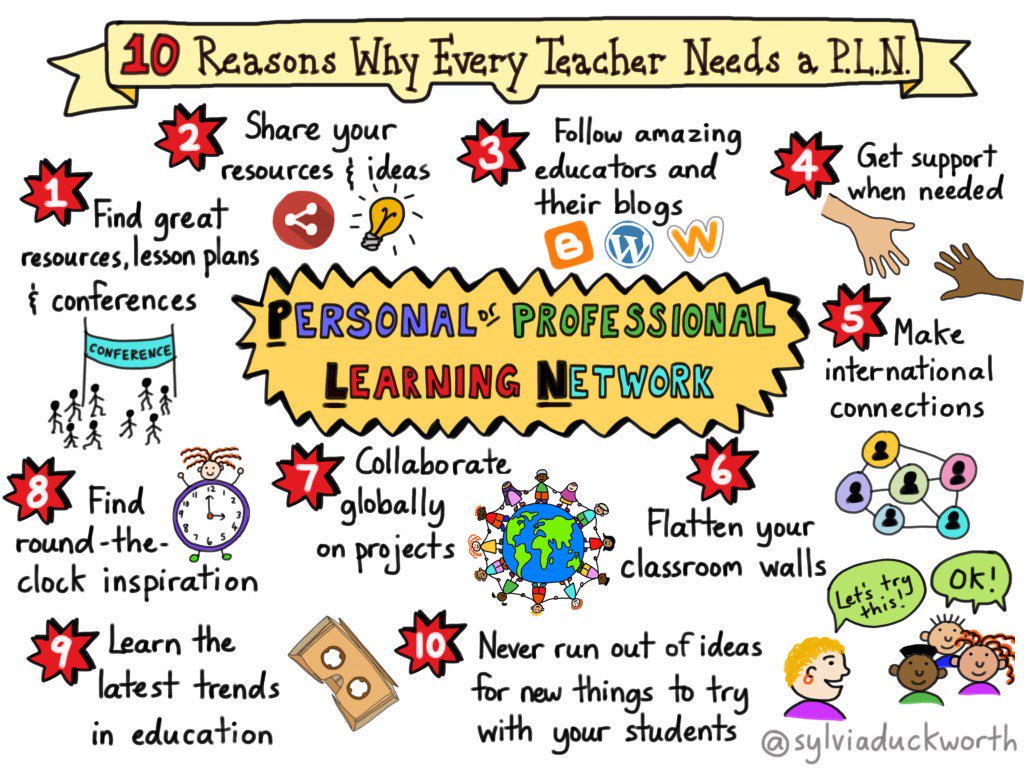
10 Reasons Why Every Teacher Needs a PLN

Created by Sylvia Duckworth

Sunday, July 31, 2016

My #ECG2016 Experience


The past 24 hours have been nothing short of an incredible learning experience where I have had the opportunity to interact with, listen to, learn from and meet (virtually, of course) other professionals in the same or in similar positions to mine. This was all done via Twitter through edcamp Global.

If you've never participated in one before, you're probably wondering....What is EdCamp? According to the Edcamp website, it's an organic, participant-driven professional learning experience. A community created by educators, for educators. The leading edge of professional development in education.

edcamp Global is unlike the traditional edcamps, which typically take place over a one day or a few hour time span. This particular edcamp, offered sessions for 24 hours to accommodate global schedules. Educators in varying fields were provided the opportunity to collaborate with other professionals from around world. I was able to connect with professionals from Canada and others who were in neighboring towns all within the comfort of my own home.

How it worked...
The same awesome features of an edcamp were provided....
  • ​an ad-hoc gathering born from the desire for people to share and learn in an open environment; and
  • conversational events featuring discussions, demos and interactions between participants, rather than a group of people listening to a particular speaker
On the day of the event, each attendee selected the sessions of interest from the schedule...
  • although many different platforms were used (Google Hangout, Twitter Chats, Periscope, Voxer, etc.), each attendee selected a session that they were comfortable to use which was linked on the schedule **I personally used Twitter Chats**
  • at any point you could "jump" to another session that met your needs
  • during the session each attendee shared and collaborated with others all over the world based upon the moderators questions based upon the topic

My sessions....
Although I surveyed and popped into several different sessions, via Twitter Chats, spending 24 hours on Twitter, or the many other platforms available, was not probable with two small children at home. However, I prioritized the ones I was able to and most wanted to attend, and fully participate in two sessions.

Session 1: The first was the #atchat moderated by Mike Marotta and Karen Janowski. The focus was on inclusive technology for all, and during this session we discussed the following questions...
  • What does inclusive technology mean?
  • How do we ensure all students have the technology they need?
  • Do you use the built in accessibility features to support your students with variability?
  • What are the indispensable AT Tools in your Toolkit?
  • What resources do you use to stay current about Inclusive/AT tools / strategies to reach all learners?
  • If you were the lead administrator in your district, what changes would you make to ensure Inclusive Tech for all?


My takeaway from this session was the importance of ensuring that all students who could benefit from AT are being provided the opportunities and for me to find ways to get that information out to the teachers I work alongside to ensure equality. Additionally, I was able to learn about some resources I was less familiar with, upcoming PD sessions and meet some other AT professionals who are now a part of my growing PLN.


To see the full transcript from this session click on the Storify link below...

https://storify.com/mmatp/atchat-edcamp-global-2016


Session 2: The second session was the #educoachtools moderated by Knikole Taylor. The focus of this session was on using technology for effective coaching, and during this session we discussed the following questions....
  • Who/what is a coach?
  • With everything expected of coaches/instructional leaders, what tools do you use to help with organization?
  • What tools/tricks can you share to give yourself more time during the instructional day?
  • Share innovative ways to give teachers timely feedback. What has worked for you?
  • How do you collect teacher's feedback on your performance?
  • What is one new tool/strategy you will implement this year as you support others?

What I found most helpful from this session were the tools that the other participants shared they use to help remain organized and maximize their time. Although, by nature, I am an inherently organized person....when working with many students who are housed within several buildings within my school district, organization and time management can pose to be a challenge. I was able to walk away with resources that will be helpful and allow me to be as effective in my role as possible.


To see the full transcript from this session click on the Storify link below...

https://storify.com/knikoletaylor/educoachtools-ecg2016


I thoroughly enjoyed the time spent participating at #ECG2016. Despite the fact that there were many other sessions I would have liked to attend, I felt fortunate to have been a part of the sessions I shared above and to connect with the people I did within those sessions. Participate Learning compiled many transcripts, videos and resources available that were shared throughout ECG. So take a peek and be sure to check out when another edcamp is coming your way.


My next one I will be attending is Edcamp AccessNY in October 2016...and I can't wait!

Wednesday, June 29, 2016

Getting Connected

 Social media is the social interaction amongst people in which they create, share or exchange information and ideas in virtual communities and networks. For professionals, or even parents, entering into the world of Assistive Technology, I can wholeheartedly share that social media is your greatest ally. I want to share some of my personal experiences in regard to social media.

AT is broad in what it can offer and in an ever evolving field, there are endless new resources available, making it seem impossible to always have your finger on the pulse.  I have always been an active participant on social media, but only for personal interactions. When I decided to grow my PLN and join the Twitter-sphere, I made a conscious decision to create a separate Twitter handle only used for professional purposes. In the short time I have been a part of Twitter, I have gained professional relationships that have helped me to build my knowledge regarding the latest in assistive technology resources available to support my students and information that I share with my colleagues and the families I work with.

I would  consider the weekly "chats" on Twitter to have lent itself as one of the greatest areas of support in my professional growth in the AT field. Every Wednesday at 8pm I participate, whether through just following or being an active contributor, on #atchat lead by Karen Janowski and Mike Marotta. It serves as a platform for professionals in the AT field to share their experiences and resources based upon several questions posed by the aforementioned moderators. Twitter "chats" are everywhere, particularly in the education field. In addition to the #atchat, there's #satchat, #edchat, #spedchat.....and the list goes on and on!

Additionally, Facebook groups, such as Assistive Technology, or the QIAT (Quality Indicators for Assistive Technology) listserv again are platforms to promote an open environment amongst professionals within the same field to ask for insight or feedback and share knowledge and experience.


This article, Use Social Media to Keep Up with Assistive Technology written by Jamie Martin, originally posted on Noodle's website, reiterates much of my own sentiments regarding social media and offers links to other valuable resources within the AT and SPED community.