

To read more about these updates, click the link below to access the full article.
Showing posts with label Apple. Show all posts
Showing posts with label Apple. Show all posts
Thursday, May 20, 2021
GAAD: Apple Software Updates Designed for People with Disabilities
Global Accessibility Awareness Day, GAAD, is a day dedicated to focusing on digital access and inclusion for the more than one billion people with disabilities and impairments. It is celebrated annually and highlights that accessibility is a fundamental right. In line with GAAD, Apple released a preview of several software updates specifically designed for people with disabilities such as SignTime which allows Apple customers and users to remotely access on-demand Sign Language interpreters or an update to the Apple Watch which will allow users to navigate Assistive Touch. Other updates include eye-tracking support for the iPad, exploring images with VoiceOver, new bi-directional hearing aids which enable those who are deaf or hard of hearing to have hands-free phone and FaceTime conversations, the ability to import audiograms to customize the settings within Headphone Accommodations, new background sounds to help minimize distractions, sound actions for Switch Control, more customizable Display and Text Size settings for colorblindness or visual impairments and New Memoji customizations to widen their representation of individuals with varying needs.
To read more about these updates, click the link below to access the full article.
To read more about these updates, click the link below to access the full article.


Friday, October 12, 2018
Friday, April 20, 2018
Friday "Appy" Hour: Apple Clips
 This Friday "Appy" Hour features the Apple exclusive app, Clips. If you follow any of the EdTech or Assistive Technology hashtags on Twitter, then at some point you have seen a post or mention regarding Clips and it's expansive features. So what's all the hype about?
Clips is a free app, which allows you to customize photos and videos before sharing them with friends and family. Within the app users can create and send video messages or narrate a story with the help of artistic filters, animated text, music, emojis, and fun stickers featuring characters.
Some highlighted features of Clips...
 Videos made easy
• create videos in real time with simple controls — no timeline, tracks, or complicated editing tools
• Record video, take photos, or add them from your library
• Easily mute audio, adjust the length of your clips, and reorder them
• Drag and pinch while recording to add smooth pan and zoom animations to your photos and videos
• Add a music track from your library or choose from more than 60 built-in soundtracks that automatically adjust to the length of your video
• Record video, take photos, or add them from your library
• Easily mute audio, adjust the length of your clips, and reorder them
• Drag and pinch while recording to add smooth pan and zoom animations to your photos and videos
• Add a music track from your library or choose from more than 60 built-in soundtracks that automatically adjust to the length of your video
Artistic effects and filters
• Turn any photo or video into a moody painting, elegant pencil sketch, or comic book illustration*
• Add warmth, impact, or drama to videos and photos with a selection of filters from the Camera app
• Use effects and filters while recording or apply them to photos and videos from your library
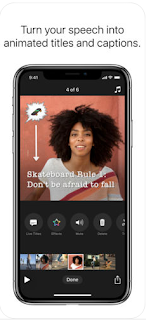
Live Titles

Fun stickers, emoji, and posters
• Add warmth, impact, or drama to videos and photos with a selection of filters from the Camera app
• Use effects and filters while recording or apply them to photos and videos from your library

Live Titles
• Create animated titles and captions using just your voice
• Captions are generated automatically as you speak and match the timing of your voiceover
• Easily change the style of your title, adjust text and punctuation, or add inline emoji
• Captions are generated automatically as you speak and match the timing of your voiceover
• Easily change the style of your title, adjust text and punctuation, or add inline emoji

• Choose from dozens of animated stickers from Star Wars, Disney, and Pixar
• Add emoji, animated speech bubbles, shapes, and customizable text labels to your photos and video clips
• Use full-screen posters with animated backgrounds and customizable text to help tell your story
• Add emoji, animated speech bubbles, shapes, and customizable text labels to your photos and video clips
• Use full-screen posters with animated backgrounds and customizable text to help tell your story
Interested in seeing Clips in action and how to connect this into the classroom? Watch the brief video created by Apple Distinguished Educator, Kristen Brooks, which provides a visual demonstration to highlight the ease of the app and built-in features.
Looking for more ideas? Read the ICT Evangelist article:
Friday, June 23, 2017
Where It's AT Blogiversary: Giveaway #4: Attainment's GOTalk Now & Bee Visual's Choiceworks & Calendar

Today's bundled giveaway is an incredible value and one not to miss....
Thanks to the amazing folks at Attainment Company and BeeVisual, LLC, all Where It's AT subscribers will have the chance to win a copy of the AAC app GoTalk Now by Attainment Company paired with a free download of BeeVisual, LLC's Choiceworks and Choiceworks Calendar. All downloads are compatible with iOS
Additionally, 3 other lucky winners will get their own download codes for Choiceworks and Choiceworks Calendar. Read below to learn more about each of the items in today's giveaway!

Attainment has been making augmentative and alternative communication (AAC) tools for 25 years. Our experience is front and center in GoTalk NOW, a flexible, easy-to-use, yet powerful app for people who have difficulty speaking.
NOW combines the simplicity of GoTalks (Attainment’s popular original AAC device) with the dynamic capabilities of an iPad. GoTalk NOW has all the essentials of an effective AAC app, like adjustable page layouts, customizable navigation, recorded and text-to-speech capabilities, and an included symbol set. But we sweated the details to create unique and compelling features that clearly separate NOW from other AAC apps.
The new NOW offers three styles of communication pages: Standard, Express, and Scenes. In Standard pages, the action occurs when the location is pressed. In Express pages, recorded or text-to-speech messages build in a speech bar and play in sequence when the bar is pressed. Scene pages are built around a single photo or image. When you arrange invisible hotspots over people or objects in the photo, the hotspots play speech, music, or videos!


 Features:
• Choose 1, 2, 4, 9, 16, 25 or 36 locations per page.
• Use images from your iPad camera, photo library, or the Imagine Symbol set.
• Search the Internet in-app for the perfect image or icon.
• Purchase SymbolStix or Widgit Symbols libraries in-app.
• Crop, scale, or rotate an image using your fingers.
• Combine multiple images in a single communication location.
• Color pages, borders, and text with any hue.
• Move and size text with your fingers so it feels just right.
• Record your voice or use our free text-to-speech voice.
• Buy higher quality voices for only 99 cents each, available in over 20 languages.
• Add spoken labels (auditory cues) to any button. Great for scanning, guiding visually impaired users, and identifying any new or difficult vocabulary.
• Trim videos in-app, and play them from any communication location.
• Select our alternate video interface to pause or exit the video easily.
• Link songs from your playlist to any communication location and control them with Pause/Play, Next, and Previous.
• Include a core vocabulary button for extra quick access to important messages.
• Create multimedia social stories and step-by-step instruction layouts by linking pages with an after action.
• Share complete communication books via WiFi with any iPad user who has NOW.
• Back up communication books via Dropbox or to any Mac or PC for safekeeping.
• Store and share interactive templates (each including speech, video, text, and jump to links) on our online gallery for free.
• Download and edit premade templates from Attainment’s collection on the public gallery, also free.
• Email links to your templates to parents and colleagues, who can open the template on their iPad by tapping on the link.
• Print and save communication book layouts via PDFs.
• Access Now with single or two-switch scanning.
Choiceworks & Choiceworks Calendar by BeeVisual, LLC

Choiceworks App

The Choiceworks App is a picture-based learning tool that helps children complete daily routines (morning, day, & night), understand & control their feelings and improve their waiting skills (taking turns and not interrupting). Created with the support of leading hospitals and child development specialists, this app is designed for caregivers to provide clear and consistent support to foster a child’s independence, positive behavior, and emotional regulation at home and in the community. It can also be customized for teachers in a school setting.
Key Features
■ Three boards: Schedule, Waiting, and Feelings
■ Three Companion Books supporting each board
■ Image Library preloaded with over 180 images and audio
■ Add your own images and record your own audio for limitless customizability
■ Attach video to any board image
■ Easily create profiles to personalize and manage multiple users
■ Save an unlimited number of boards for multiple children or different routines
■ Speaks boards out loud with professionally recorded audio
■ Time saving essentials like search and auto-save
■ Share boards by Email or iTunes File Sharing with other Choiceworks app users
■ Ability to print boards or save as PDF

The Choiceworks Calendar is a full-featured, kid friendly calendar app designed to help children learn concepts of time and help caregivers to keep them organized. By presenting the abstract concept of time in a structured, visual format, Choiceworks Calendar helps children organize their lives as well as understand sequence and time.
■ Easily create a visual calendar of upcoming events in a few minutes (examples: holidays, when visitors are coming, doctor appointments, vacations, sleepovers, parent returning from a trip or military duty)

■ Image Library preloaded with over 275 images and audio
■ Add your own images using your photo library, camera or use the preloaded image library to record your own audio and edit captions for limitless customizability
■ Create multiple personalized calendars for use with multiple children or in a classroom setting
■ Count Days Until: animated counter for the number of days until an upcoming event (example: How many days until my birthday?)
■ Speaks the daily schedule
■ Built-in visual timer
■ Automatically adds holidays
■ Easily add reoccurring events
■ Notifications and alarms with visual and audio alerts
■ Search and auto-save features
■ Share boards by Email or iTunes File Sharing with other Choiceworks Calendar app users
■ Ability to print month, week or day for offline viewing or save as PDF
Friday, June 9, 2017
Friday "Appy" Hour: A First Look at iOS 11 on the iPad Pro

- Apple Pay will now feature person to person transactions
- Siri will now feature a more natural, human sounding voice and expand the languages translations can be provided in
- Images in the camera app will take up less space and offer more high quality options and special effects
- A redesigned Apple Control Center and iTunes Store
- A drag and drop dock which mirrors the Mac
- Files app provides a file management system
- Indoor maps to use within venues and public places like malls and airports
- Maps has added new safety measures to limit distractions while driving and provide a more interactive guidance system when utilizing navigation
- Multi-room support for Apple Music and similar to apps like Spotify, users will be able to see what friends are listening to
- The ability to blend virtual reality using ARKit
To learn more about these latest enhancements, click here to read The Verge's article focused on the Apple announcements or watch the video below.
Source: The Verge
Thursday, January 19, 2017
ATIA 2017 - AT Bootcamp Highlights (Day 2)

The second day of the AT Bootcamp, facilitated by Mike Cole and Kelly Fonner, was filled with a tremendous amount of information regarding accessibility, AT tools to support devices and tools to support language, writing and mathematics. Today was jam packed with resources and information to support the successful selection and implementation of AT and AAC. The information below only touches the surface of some of the highlights from today's session. Again, my hope is you find this as helpful as I did...

2. Switch Access: For those individuals with limited or no usage of their hands switch access can can provide opportunities for independence and communication which normally would not be possible. Additionally, switch access is often utilized by people with limited mobility, motor impairments or degenerative diseases where dexterity is impacted to allow interaction with the touch screen. During AT Bootcamp, we were presented with both proximity and mechanical switches and discussions focused on the selection process when switch access is being considered.
 A checklist was shared to determine ideal control sites and placement for switches as well as some helpful tips for the implementation of switches.


With so much to consider for switch access, the greatest take away I had was to always "assume competence". By doing so, the process for determining the right tools to provide access. For more information about switch access visit the Better Living Through Technology website.
3. AAC: Mike and Kelly provided an in-depth look at the expansive topic of AAC with the session covering areas from AAC models & assessment, low to high tech tools, a comparison of dedicated devices compared to applications, AAC considerations, examples of symbols sets and implementation strategies. Some of the information discussed can be found in the slide images below:


The information shared helped to simplify a normally overwhelming area and even delved into debunking many myths revolving around AAC. To read about AAC myths visit Carole Zangari'sAAC Myth Buster Wrap Up or Tobii Dynavox's AAC Myths Revealed
For those looking for an excellent resource to determine goals for initial and re-assessments regarding AAC, definitely take a peek at TobiiDynavox's DAGG-2 (Dynamic AAC Goals Guide 2)
4. Academics: Other conversations focused on literacy, writing and mathematics. With so many resources to share I am listing a few standout key applications and software covered during the bootcamp:


3. AAC: Mike and Kelly provided an in-depth look at the expansive topic of AAC with the session covering areas from AAC models & assessment, low to high tech tools, a comparison of dedicated devices compared to applications, AAC considerations, examples of symbols sets and implementation strategies. Some of the information discussed can be found in the slide images below:


The information shared helped to simplify a normally overwhelming area and even delved into debunking many myths revolving around AAC. To read about AAC myths visit Carole Zangari'sAAC Myth Buster Wrap Up or Tobii Dynavox's AAC Myths Revealed
For those looking for an excellent resource to determine goals for initial and re-assessments regarding AAC, definitely take a peek at TobiiDynavox's DAGG-2 (Dynamic AAC Goals Guide 2)
4. Academics: Other conversations focused on literacy, writing and mathematics. With so many resources to share I am listing a few standout key applications and software covered during the bootcamp:
- Ginger
- Co:Writer
- Draft Builder
- Read & Write
- Webnotes
- Draft Builder
- Clicker (Connect, Sentences, Docs)
- Snap & Read
- Grammarly
Thursday, December 1, 2016
Apple Showcases Accessibility Features
Apple's redesigned accessibility webpage launched a few weeks ago and is showcasing how essential assistive technology is for people with disabilities. Unlike the previous version of Apple's site, which displayed Apple's disability-friendly technology through straightforward descriptions and static photos, the new site shows Apple's AT in action through short 30-second videos. Below you can find the links to view these short trailers.
 On December 20th, I will be attending an Apple Tools for Special Needs conference held in Long Island, NY where I will have a firsthand look at the new and improved accessibility technology available. If you're in the area and are interested in attending, click the link to register.
To learn more about the accessibility features from Apple, read the Mashable article New Apple accessibility videos showcase real people using life-changing assistive tech by Katie Dupere.
On December 20th, I will be attending an Apple Tools for Special Needs conference held in Long Island, NY where I will have a firsthand look at the new and improved accessibility technology available. If you're in the area and are interested in attending, click the link to register. It's technology that is changing the lives of people with disabilities around the globe, enhancing the way they interact with the world on a daily basis. -Katie Dupere, Mashable.com
 |
| Click above to see the Alanna Flax-Clark using the Workout App. |
 |
| Click to watch a trailer of Sady Paulson using the Switch Control. |
 |
| See Mountain Guide, Win Whittaker, using the Live Listen accessibility feature. |
 |
| Click above to watch the VoiceOver features used by Mario Garcia. |
 |
| Click above to explore all accessibility features available through Apple. |
To learn more about the accessibility features from Apple, read the Mashable article New Apple accessibility videos showcase real people using life-changing assistive tech by Katie Dupere.
Tuesday, September 13, 2016
Apple’s New Features For People With Disabilities

With the release of the latest Apple iPhone and iWatch, it seemed fitting to review some of the latest accessibility updates. The article I'm sharing below, written by the Assistive Technology Blog (ATB) in June 2016, highlights these accessibility updates for the iPhone, iWatch and iOS.
-----------------------------------------------------------------------------------------------------------------------------
Just yesterday, Apple announced
several new features that will bring in lots of additional functionality
and convenience across all products in this coming fall. However, what
are some of the features that can be used by people with disabilities?

It seems like a lot of new features
will enable people who have visual impairments, impaired motor skills,
muscular dystrophy/atrophy, and other similar disabilities to interact
with the devices just with their voice and get desired results very
quickly and efficiently. Using the new features with an additional eye
tracking device for those
who need it can definitely enhance their
experience as well.
iOS for iPhone and iPad get the most
features in the upcoming release. By just talking to Siri, a user could order a ride, send money to someone, order food, and do similar
activities.
 Contextual
prediction is being introduced which means that iOS will predict what a
person is trying to type by making suggestions in various contexts. For
example, if someone is typing “I am available today at”, the free time
on their calendar will pop up as an option. Similarly, when typing
“John’s phone number is”, John’s phone number will be pulled from the
address book and displayed as an option.
Contextual
prediction is being introduced which means that iOS will predict what a
person is trying to type by making suggestions in various contexts. For
example, if someone is typing “I am available today at”, the free time
on their calendar will pop up as an option. Similarly, when typing
“John’s phone number is”, John’s phone number will be pulled from the
address book and displayed as an option.
Search has been enhanced to use
artificial intelligence. iOS can detect objects in photos, and a user
can now search for just the photos that were taken at the beach, for
example.
Apple Pay is coming to various
shopping websites so no need to type in a credit card number and other
information every time a user goes to a shopping website. Purchases can
now be made with just a click of a button in a secure manner.
WatchOS
In
the upcoming release, apps will load much faster. A user would also be
able to add minutes to a parking meter, order their food, and make other
similar purchases using Apple Pay on their watch.
 The fitness aspect of the watch has
included a wider audience now – wheelchair users! Wheelchair users will
be able to track their physical activity through various pushing
techniques for various speeds and terrains. Wheelchair specific workouts
have now been included, and notifications will be sent every hour for
“time to roll” when a person has been sitting and not moving for a long
time, to encourage them to be active.
The fitness aspect of the watch has
included a wider audience now – wheelchair users! Wheelchair users will
be able to track their physical activity through various pushing
techniques for various speeds and terrains. Wheelchair specific workouts
have now been included, and notifications will be sent every hour for
“time to roll” when a person has been sitting and not moving for a long
time, to encourage them to be active.
Pressing the side button initiates a
call with local emergency services anywhere in the world. It can also be
used to send a quick text to a user’s emergency contacts.
Wearing an Apple Watch will also work
as an authentication mechanism for a user’s Mac. When a user wearing an
Apple Watch approaches their Mac, the Mac senses their presence and logs
them in automatically. No need to type the password for unlocking the
computer.
The new “Home” app will also let users
control connected (Internet of Things) devices around the house using
their phone, tablet, watch or TV. Location based automation can also be
set up using the Home app – if a user is approaching the house, turn on
the lights, pull up the blinds, and set the thermostat to 68 degrees.
MacOS (formerly OS X)
Siri is now coming to Mac. Siri can
locate files for a user (“Show the pdfs in my Downloads folder”, “Show
my photos from yesterday”), add and modify events (“Add Laura to my 10
AM meeting”), search for images from the internet (“Show me images of
Lake Tahoe”), play music, check weather, and do lots of other things.
These are some of the features that
people with disabilities can use that will make things easier for them.
We should hopefully see a full list of accessibility features from Apple
in the near future.
Subscribe to:
Posts (Atom)


