If you haven't heard of Vooks yet, you'll be glad you did after today! Vooks is an online streaming program that has an entire library of storybooks brought to life with beautiful animation, read-aloud narration, engaging music and sound, and read-along text. As stated on their website "Vooks inspires a love of reading by making books accessible to children of all levels, and all learning abilities."
Vooks is a paid subscription for families ranging from $4.99 a month to $49.99 for the year. However, they do offer a free 30-day trial which allows for you to see if it is the right tool for you and your child. For educators, Vooks is FREE!!! It can be watched on singular device, such as an iPad, laptop, phone or TV, and is ad-free. Additionally, Vooks is now available on Netflix.
Access to AAC and the right to communicate are basic rights that are being eroded by the stress the pandemic has put on the whole system. That’s why, to mark Autism Acceptance Month we offer our traditional discount for a longer period and to more products.
Save the date
From 30th March until and including 6th April 2021 we’re offering our usual 50% discount on:
Proloquo2Go (Mac & iOS)
the Gateway vocabulary (in-app purchase in Proloquo2Go)
Proloquo4Text (Mac & iOS)
Keeble
Pictello
Our AAC videos on-demand
For schools - the discount on our apps also applies to Apple’s Educational Volume Purchase Program (VPP). When your school or educational organization purchases 20 copies or more, you get an additional 50% off - that’s a total of 75% off!
The amazing folks at Call Scotland have recently released the latest poster in their popular 'App Wheel' series in response regular queries about useful iPad apps for complex learning difficulties. The 'Wheel of Apps' is not comprehensive, but attempts to identify relevant, useful apps and to categorize them into the areas where an iPad can be a useful tool for learning and teaching. It is important to note that some apps address a range of difficulties. The wheel features a mix of apps, some of which will be useful for using with Primary aged learners, some with Secondary aged learners and some with both.
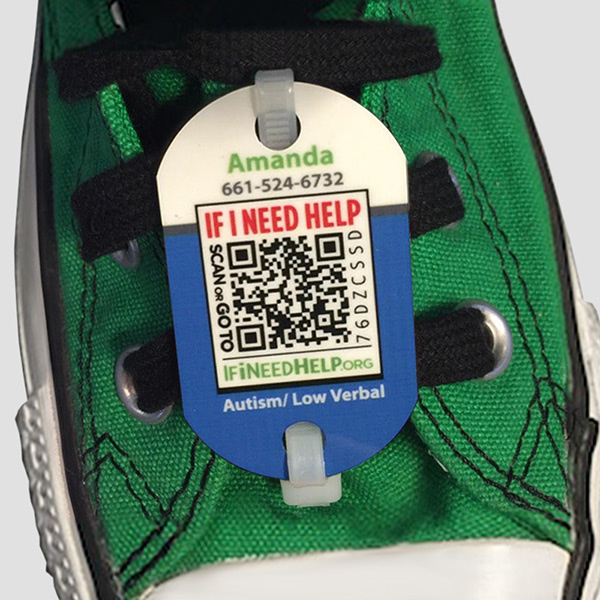
All too often we hear stories in the media of children or adults with cognitive disabilities or other needs who wander, run away from or otherwise leave a caregiving facility or environment. The concerns when this happens always center around whether the individuals are able to communicate with those offering help. For this week's Friday "Appy" Hour, I felt it was important to share a system that can provide comfort to those who have a loved one who has Autism, Down Syndrome, Epilepsy, Alzheimer’s disease, or other issues with disorientation. The If I Need Help system mitigates the risks to your loved one or students by bypassing communication barriers.
A profile for your loved one on our special needs registry
A confidential Emergency question and answer section that can be printed or emailed in an emergency
A QR-code enabled ID tag that can be worn or fastened to your loved one’s clothing
When you or your loved one is discovered lost or needing help, any finder can notice the QR code tag, scan it, and instantly have access to the information you have chosen to include in the profile, including contact information, one’s name and condition, and anything else pertinent to an emergency.
April is Autism Acceptance Month and the folks at Assistiveware are looking forward to celebrating. They will amplify autistic voices by sharing resources and blogs written by the autistic community. With this celebration is the return of the 4-day discount of their apps including Proloquo2Go, Proloquo4Text, Pictello, Keeble and Gateway. Each will be discounted at 50% off.
Save the date!
The 50% discount will be in effect worldwide from Tuesday, April 2 to Friday, April 5. No need to fill in a discount code - you’ll see the discounted amount in the App Store.
Discount also available for volume purchase discount
The discount also applies to Apple’s Educational Volume Purchase Program. When your school or educational organization purchases 20 copies or more, you get an additional 50% off. That’s 75% off!
Children and teachers today are under great pressures due to unique academic, social and emotional challenges. Kids are experiencing greater pressures earlier in life, and feel more stress and anxiety than ever before. These demands have led many school districts to begin shifting their focuses onto incorporating mindfulness in the classrooms. This can be done through the addition of peaceful music, movement breaks, yoga, deep breathing, and so on. Given this movement in schools nationwide, it seemed fitting to dedicate a Friday Appy Hour to an app that supports mindfulness.
This week we are taking a peek at Calm. At Calm, their mission is to make the world a happier and healthier place. The app, created 4 years ago, was initially created to provide mindfulness tools and resources for adults. However, in more recent months the focus has shifted towards the opportunity to bring mindfulness to teachers and children all over the world.
Calm's goal is to,
"Empower kids to thrive, not just survive."
As stated on Calm's website, "Numerous studies have shown the many benefits of teaching mindfulness to children. Through mindfulness education, kids can develop a lifelong capacity for greater self-awareness, concentration, patience, and resilience.
Meanwhile, educators face pressures of their own. Many teachers understand the benefits of mindfulness, but they face time and budget constraints, making it challenging to bring mindfulness education to the classroom.
That’s why we’re launching The Calm Schools Initiative. We are offering every teacher in the world free access to Calm, the mindfulness app that hundreds of thousands of people all over the world use everyday. Our aim is to empower teachers with mindfulness tools and resources they can use to help kids learn this new skill."
The Calm Schools Initiative allows for any teacher with a K-12 classroom, to gain free access to the application's paid subscription service. Teachers can access the subscription on Android, iOS and the web. Through the subscription, teachers will have unlimited access to an expansive library of guided meditations and mindfulness exercises, including Calm Kids, which is a mindfulness and meditation program tailored for age groups from pre-K through high school.
Sound interesting? If so, you may be asking how to begin. Teachers fill out a simple form (link here). Once you submit the form, the Calm Schools Initiative contacts you within a few days with your approval and some resources and suggestions to get your started. If you’re a parent or student, forward this page to your teacher and let them know how important mindfulness education is to you. Either way, have fun discovering the power of meditation!
This is the latest poster in Call Scotland's popular 'App Wheel' series created in response to ongoing inquiries regarding useful iPad apps for complex learning difficulties. The 'Wheel of Apps' is not comprehensive, but attempts to identify relevant, useful apps and to categorize them into the areas an iPad can be a useful tool for learning and teaching. Note that some apps address a range of difficulties. The wheel features a mix of apps, some of which will be useful for using with Primary aged learners, some with Secondary aged learners and some with both.
Please note that the links on the electronic version are 'clickable' and will take you to the iTunes UK App Store, where you can find out more about the individual apps and download them onto your iPad. Note that links in the poster are to the UK iTunes site (GB), to go to the US store, simply change "GB" to "US" in the URL.
For this week's Friday "Appy" Hour we will be discussing the app Seesaw. Seesaw is a powerful multimedia learning and communication tool that demonstrates students progress over time. As shared on Common Sense Media, "The Learning Journal is a robust digital portfolio and learning system where teachers can create meaningful multimedia experiences for students. Using Google, Clever, student emails, or a QR code, teachers assign tasks that engage students with a variety of work in the form of videos, photos, text, images, files, and drawings. Teachers follow up by approving posts, offering feedback, and, if desired, making items accessible to families via the Seesaw Family app (available online and via Android or iOS). Since teachers can view all students’ submissions at once, it’s an easy way to check for whole-class understanding. Teachers can also enable peer-to-peer feedback or create a class blog to encourage a richer, more connected experience. For added security, the blogs can be password protected, and teachers can opt to moderate posts.
Designed with an intuitive interface, Seesaw logically leads teachers through processes such as creating assignments, recording directions, providing student feedback, and sending family communications. Translation is available if the device language settings are different from the original message. The Activity Library hosts a variety of activities aligned with Common Core for all grade levels, and the Help Center provides lots of support as well as professional development online for teachers. A paid upgrade allows tracking of skills mastery."
The video below shows an overview of Seesaw. Be sure to read below for an expansive list of webinars to help get you started or learn more about all that Seesaw has to offer.
During the month of November, Seesaw has provided the following webinars based on your level of use and familiarity with . Click on the link to see times, dates, and register.
This past summer I was honored to be accepted as part of the latest class of Book Creator Ambassadors. Book Creator has become a staple in the edtech world and revered as a top educational app in many classrooms not only around the country, but around the world. It's easy to use interface, simple integration with curriculum and ability to be partnered with many other apps, including Flipgrid, make this a tech tool you'll keep coming back to. Looking to learn more about Book Creator? Visit their website or watch a brief video that provides an overview of all that Book Creator has to offer.
If you're already fan of Book Creator and are interested in moving to the next level of use, or are a novice interested in learning more about the app, becoming a Book Creator Ambassador is the next best step. Click here or on the link below to submit your application. The process is easy and the benefits of becoming part of the ambassador program are vast.
Notability, created by Ginger Labs, released it's 8.0 version update this week and it's garnering a lot of attention in the world of AT and Ed Tech.The latest update includes unique features including handwriting recognition, searchable handwritten notes, and handwriting to text conversion. With Multi-Note, two notes can be open side-by-side. And the new Note Switcher makes it quick to change notes.
So what does this all mean? The video below provides an overview of what is included in the latest updates as well as a breakdown of the updates below...
Handwriting Search Handwriting in Notability is now searchable!
Handwriting can be searched in the note view and from the library. Handwriting recognition and indexing all happens on the device, keeping notes private. Additionally, 14 different languages are supported and searchable on Notability including:
With the latest update, individually written words or full lines of text can be converted into typed text. Once converted, the text can be copied to the clipboard and pasted into other apps, like Mail or Messages.
Multi-Note The Multi-Note features proves to be the biggest time saver giving users the option to work with two notes side-by-side. In addition to saving time, Multi-Note provides more context, and makes editing and reviewing notes more natural.
If you're unsure how to use the Multi-Note features, here are a few suggested ideas:
Highlight terms in a textbook and then summarize concepts in another note.
Keep a meeting's full agenda in view while taking minutes in a separate note.
Use a blank note as a scratch pad while working on a class assignment.
Make a note of frequently-used drawings, and simply drag them into other notes at any time.
While reading a recipe, jot down the ingredients you need in a shopping list.
All of the tools available for a single note are also available when using two notes at once, like add and edit annotations, zoom in and scroll around to capture details, rearrange pages, copy-and-paste pages between notes, drag-and-drop content between notes, and more.
Audio can be recorded in one note while editing and switching between other notes. This makes Notability's unique audio recording and playback feature more powerful than ever. No longer does audio recording have to stop in one note to check another.
Note Switcher and Recent Notes The new Note Switcher is a quick and convenient list of the recently opened notes. Notes can be switched without going back to the Library. Note Switcher includes search too, to help find other notes.
The Library now includes the new Recent Notes list. This is particularly useful for finding, sharing, and working with notes stored in different subjects.
Costs and Availability Notability 8.0 can be download from the App Store, and is compatible with the iPad and iPhone running iOS 10 or later. All current Notability users can update their apps for free to access Version 8.0. Not a Notability user, yet.....Notability can be downloaded for $9.99 USD. Certainly an app that you get more bang for the buck! Source: Blogpost adapted from Gingerlab Update Article
This Friday "Appy" Hour features the Apple exclusive app, Clips. If you follow any of the EdTech or Assistive Technology hashtags on Twitter, then at some point you have seen a post or mention regarding Clips and it's expansive features. So what's all the hype about? Clips is a free app, which allows you to customize photos and videos before sharing them with friends and family. Within the app users can create and send video messages or narrate a story with the help of artistic filters, animated text, music, emojis, and fun stickers featuring characters.
Some highlighted features of Clips...
Videos made easy
• create videos in real time with simple controls — no timeline, tracks, or complicated editing tools • Record video, take photos, or add them from your library • Easily mute audio, adjust the length of your clips, and reorder them • Drag and pinch while recording to add smooth pan and zoom animations to your photos and videos • Add a music track from your library or choose from more than 60 built-in soundtracks that automatically adjust to the length of your video
Artistic effects and filters
• Turn any photo or video into a moody painting, elegant pencil sketch, or comic book illustration* • Add warmth, impact, or drama to videos and photos with a selection of filters from the Camera app • Use effects and filters while recording or apply them to photos and videos from your library
Live Titles
• Create animated titles and captions using just your voice • Captions are generated automatically as you speak and match the timing of your voiceover • Easily change the style of your title, adjust text and punctuation, or add inline emoji
Fun stickers, emoji, and posters
• Choose from dozens of animated stickers from Star Wars, Disney, and Pixar • Add emoji, animated speech bubbles, shapes, and customizable text labels to your photos and video clips • Use full-screen posters with animated backgrounds and customizable text to help tell your story
Interested in seeing Clips in action and how to connect this into the classroom? Watch the brief video created by Apple Distinguished Educator, Kristen Brooks, which provides a visual demonstration to highlight the ease of the app and built-in features.
Looking for more ideas? Read the ICT Evangelist article:
For many students, a simple tool can help to improve organization and overall executive functioning. The short list of such tools, compiled by BridgingApps, provides suggestions to support students through the use of visual schedules, social stories, as well as academic and personal organization.
Although this year I was unable to attend the IDA (International Dyslexia Association) Conference, I did use the power of social media to keep up with some of the highlights being shared by my Twitter PLN (Personal Learning Network). As a sidebar, if you are unsure of what a PLN is or the immense benefits of being connected on social media, please read by previous Where It's AT post "Getting Connected".
Amongst the Twitter highlights from IDA, I happened upon a post regarding an app called Easy Spelling Aid. After doing some quick reading, my interest was peaked and I needed to see firsthand what this app was all about.
As with my first encounter with Epic!, my initial thought was.....how did I not know about this app sooner? As a technology specialist, I immediately thought of the many students who require ongoing spelling support, and Easy Spelling Aid app does just that! Not only is this app suited for students and adults with learning difficulties, but also for those learning to read and write or others looking for a translation tool to and from English?
The Easy Spelling Aid app is the perfect tool to help children learn how to spell and write any word at home and at school. This app can spell words or phrases instantly by utilizing superior speech recognition, finely tuned to pick up on your child's voice. Key Features...
Improves literacy performance and spelling, helps with comprehension and vocabulary and develops recognition and correct spelling of words in their appropriate context
Reduces blocks in the creative thought process when users stumble across a word they cannot independently spell.
Provides a way to easily and quickly find out how to spell the word without having to wait for a parent, teacher or assistant to help them.
Boasts superior, accurate and incredibly fine-tuned speech recognition
Supports 22 languages, including regional US English
Includes writing styles US D'Nealian Manuscript and US D'Nealian Cursive.
Also includes the Open Dyslexic font displayed in a choice of 6 background color combinations, as a means to accommodate users suffering from dyslexia and improve readability.
No ads, in app purchases, externals links and profanity is filtered
How It Works...
Step 1: With an easy-to-use interface and seamless user experience, users are presented with a clear blue user-friendly interface. The instruction "Touch mic & talk" is displayed above the circular mic symbol. On touching the symbol, you will be prompted to "Talk". By pressing "Done", the app will begin processing the word or phrase dictated.
Step 2: Upon pressing "Done", the app will proceed to produce your input displayed in your chosen writing style.
Step 3: The chosen writing style can be changed in the Settings, which are also easily navigated to from the main screen. Additionally, within the Settings, you can change between multiple languages, select translation language, reverse translation, select a background, select a dyslexic option, display upper and lower case letters and turn off speech output if you wish.
Cost...
The Easy Spelling app is available on Google Play, Amazon Apps and the Apple App Store.