Pages

Showing posts with label UDL. Show all posts

Wednesday, May 15, 2019

Webinar Wednesday: Apps, Extensions, and Tech Tools for ADHD Brains: A Learning Guide

In this hour-long-webinar-on-demand, learn the most popular and effective technology tools for students with ADHD, with Janet DeSenzo.
Students don’t learn material that fails to engage them. Kids, especially those with unreliable attention and focus, lose interest quickly if the curriculum feels inaccessible and intangible. Many schools today are responding by using technology tools and the Universal Design for Learning approach.
Here, learn about the most popular and effective technology tools for students with ADHD and learning disabilities. Geared for educators, parents, and clinical professionals, this webinar will explain how to maximize students’ learning through the use of apps and tools for Chromebooks, iPads, Windows, and Macs. Teachers will also pick up lesson plans and strategies for incorporating technology into their UDL classrooms, and learn why educators are shifting the focus from accommodating students with ADHD to creating a more accessible, engaging curriculum.
In this webinar, you will learn about:
  • Great Chrome apps and extensions for helping differently wired students
  • iPads apps designed to maximize your child’s learning, plus the many tools built into the iOS operating system
  • Tools offered by Microsoft that can assist with organization and productivity
  • How to set up a Universal Design for Learning classroom, and how it supports all types of learners


Meet the Expert Speaker:
Janet DeSenzo has been working in the field of assistive technology for more than 15 years. She started working with college students at the university level, assisting students with disabilities as the coordinator of Disability Services at a state university in New Jersey. From there, she started her own educational consulting company, JanTech Educational Services, which she still owns and operates. Janet is currently an assistive technology specialist and technology integration specialist in the Vernon Township School District of NJ. There, she helps find technology solutions for students with special needs and assists teachers with integrating technology into their everyday lessons.

Wednesday, February 7, 2018

Webinar Wednesday: Access Abilities Podcast with Luis Pérez

UMass Amherst Assistive Technology Center's Kelsey Hall and Josh Pearson recently created the Access Abilities podcast. Their first podcast features educator, photographer, and published author/consultant Luis Pérez. To learn more about UDL [Universal Design for Learning] and assistive technology, be sure to listen to this informative and insightful interview


Click on the link to follow the AccessAbilities Podcast

A transcript of the podcast can be found at bit.ly/2F3YxBV

Wednesday, January 31, 2018

Webinar Wednesday: AT Chatter - Early Learning Webinar

AT Chatter: Early Learning webinar

Date: February 5, 2018
Time: 11:30-12:30
Presenter: Rose Racicot, MS, OTR/L, AT Specialist


Registration Information:


Or contact via E-mail Sue Wright at the SETC office to register, wrightsu@cwu.edu

Description:
This is an opportunity for Washington state AT providers and educational team members to come together in an informal on-line gathering to discuss current AT Topics. We will have a facilitator who will start the webinar, provide questions and facilitate the participant discussion. Questions will be sent out to registered participants prior to the scheduled Talk. This AT Chatter will focus on AT for Early Learning.

Presenter:
This event will be facilitated by Rose Racicot, MS, OTR/L is an OT and Assistive Technology Program Specialist in Kent School District with 30 years of experience. She has conducted research and been published on “The Effect of Multimedia Software on Written Productivity”. She presents workshops on literacy support software, UDL, iPad and other AT topics at state and national conferences as well as guest lecturing at local OT and OTA schools. She is passionate about helping educators implement Universal Design for Learning principles to create inclusive classrooms for all students to succeed.

Tuesday, January 2, 2018

Digital Does Not Equal Accessible!

Digital Does Not Equal Accessible is an article written by Hillary Goldwaith-Fowles, PhD, ATP, which focuses on an important area of discussion that arises in the field of assistive technology. It is often a misconception that because materials are presented digitally this would also imply that they are accessible for those who need materials to be presented in such a way. With the help of her Twitter PLN, Dr. Fowles helps to break down how digital does not always equate to accessible, and how we as professionals, parents and even students can help to ensure that materials are accessible to those who require them to be. Read the article featured below or click here to access Hillary's website to read this article and others she has shared. 


Interested in learning more? Be sure to grab a copy of Hillary's book One Size Does Not Fit All: Equity, Access, PD and UDL


We’ve recently refreshed the copiers in our district. You’d think this wasn’t a big deal, however, the ability to scan in color is pretty exciting (I know, it doesn’t take much to bring joy to my world)!  This opens up a whole new level of possibility for teachers who, with the best of intentions, want to ensure that students have access to content on a tablet or laptop.
This is a great idea.  Paperless classrooms are now a “thing”, and that’s great for the trees and the environment! Simply scanning documents into a copier and posting them in Google Classroom DOES make them digital. It DOES lend itself to a paperless classroom. However, what it does NOT do is make that media ACCESSIBLE.
What does accessible mean? When we are talking about content that is on a computer phone, or tablet, we mean that ANY user can use tools to access the content (i.e. screen reader, text to speech, magnification software, etc).  The content literally comes to life for a user with (or without) disabilities.
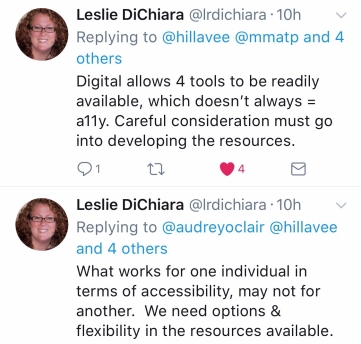
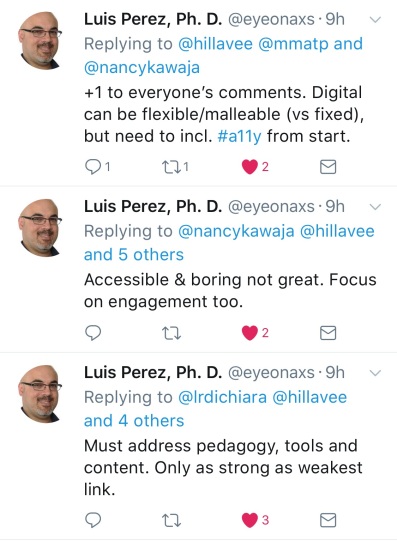
I posed this question a while ago on “the Twitter”, as I know I’m not the first person to talk about this concept, or face this dilemma in their setting.  In reaching out to my PLN (Professional Learning Network, I received some wonderful responses! Here’s what they had to say when I posted the graphic “Digital does not Equal Accessible” and asked for their thoughts.
Nancy4thewin
In other words- ALL means ALL.

leslieaudrey
In other words, intentional use, with end user (i.e. students) as focus.

audreymikeuse
In other words, don’t be afraid to explore and allow students to explore as well! 
leslie
In other words- Dear Developers, please listen to us as you continue to develop tools to support ALL  learners.

MikeMarotta
There are no other words here- this about sums up this whole blog  post! 

Luis Perez
In other words, forethought, not afterthought. 

cheryloakes.jpg
In other words, leverage UDL.
I also took the time to email John Brandt  from MaineCite and Cynthia Curry from CAST and the National Center on Accessible Educational Materials (AEM Center) on the subject, as their primary roles in their work center around accessibility.
John graciously shared some resources, which help in building understanding around accessibility as a forethought, not an afterthought:
Cynthia Curry, in the most eloquent of ways, summed up how to think about accessibility rather nicely:
“Materials can be born print and require retrofitting
Materials can be born digital but difficult or impossible to retrofit
Materials can be born accessible and thereby readily usable”
I hope this post and resources are helpful to you in developing deeper understanding of accessibility. Many thanks to  John Brandt,  Cynthia Curry, Leslie DiChiara, Nancy Kawaja, Mike Marotta, Cheryl Oakes, Audrey O’Clair, and Luis Perez for their time, expertise, and invaluable contributions.
” Do the best you can until you know better. Then when you know better, do better”
– Maya Angelou*.
*Cynthia Curry used this quote in a presentation at ACTEM in October. I love it.

Permission to share this article directly on the Where It's AT blog was granted by the author of the article. 

Thursday, November 30, 2017

Accommodations for Dyslexia

With a rise in learning standards across the nation, school can often be a daunting place for students with Dyslexia or other reading disabilities. With the support of the team working with the students and the right accommodations in place, the burden of learning can be lessened, allowing greater access to the materials being presented. The following article by the University of Michigan's Dyslexia Help website focuses on the correlation between accommodations and the success of students with Dyslexia. The article contains a list of possible acc
ommodations and suggestions that may be beneficial in order to decrease a student’s frustration and increase their academic success. To read the full article and see the in-depth list, click on the link below. 
  • Know which of your students have 504 plans and IEP. 
  • Provide a course syllabus ahead of time and announce projects and/or tests a week or two in advance. 
  • Make the assignments explicit. 
  • Provide hands-on learning experiences whenever possible.
  • Encourage students with dyslexia to turn in a draft early for feedback.
  • Provide a peer buddy that can sit near your student with dyslexia.
  • Do not ask your student with dyslexia to read aloud in front of peers.
  • Give the student time to process a question before answering. 
  • Remember to cultivate the student’s strengths and interests within your discipline whenever possible.
  • Use Universal Design in your classroom instruction.
  • Know the accommodations a student will need beforehand for standardized tests like the ACT and SAT. 

Wednesday, June 28, 2017

Where It's AT Blogiversary: Giveaway #6: Elevating Co-Teaching through UDL book & iOS App Bundle

*In order to be eligible to win you must be a confirmed subscriber of the Where It's AT blog and complete the entry form below!*

*Update: Congratulations to our randomly selected winner: Cheryl L.! Be sure to check out each day's giveaways!*


If you missed out on yesterday's giveaway, there's no need to fret....today's bundled giveaway is yet another incredible one not to miss!

UDL [Universal Design for Learning] stands at the forefront for many professionals as the goal is to promote and develop universal access to educational curricula for all students, including those with disabilities. The book Elevating Co-Teaching through UDL by Elizabeth Stein is the perfect way to delve into best practices and how to begin creating an environment suitable and accessible where all learners have an opportunity to experience learning. For today's giveaway, Where It's AT Subscribers have the chance to win a copy of the book Elevating Co-Teaching through UDL by Elizabeth Stein partnered with downloads of several of my favorite iOS apps [valued at over $100] including:
*Be sure to click on the hyperlinks to learn more about each app...


Read more about Elevating Co-Teaching through UDL 
by Elizabeth Stein


Co-teaching—the practice of having special education and regular education teachers work together in inclusive classrooms—is one way to ensure that all students have equal access to challenging academic content. But the practice is a challenging one, requiring thoughtful planning and execution by cooperative classroom professionals. Universal Design for Learning (UDL), a framework for designing inclusive learning environments, offers co-teachers structure and guidance in pursuing their goal to create successful learning environments for all students. In this book, veteran co-teacher and UDL expert Elizabeth Stein shows how to apply the UDL principles and guidelines to the practice of co-teaching. How does UDL inform the lesson-planning process? What does UDL look like in the classroom? What role does formative assessment play? How do you get buy-in for the UDL approach from administrators, parents, and students themselves? These and other questions are answered in this must-have book for anyone interested in co-teaching.

Wednesday, June 14, 2017

Wednesday, April 19, 2017

5 Types of Adaptations for your Inclusive Classroom


The Brookes Inclusion Lab is an interactive blog which provides tools and resources to promote and enhance UDL and inclusiveness within the classroom learning environments. Today’s post, 5 Types of Adaptations for your Inclusive Classroom, brings you five approaches for adapting instruction in your inclusive classroom, so students with and without disabilities can participate and learn academic content. Adapted from Rachel Janney & Martha Snell’s practical guide to Modifying Schoolwork, these strategies can be used in any combination to best meet the needs of your individual learners. After testing these strategies out, please share below in the comments which adaptations have worked best in your classroom!


 Grab a peek at the five adaptations below, and
*Alter the instructional arrangement

*Alter the physical or social environment

*Alter your methods and materials

*Alter the process or task

*Alter the level of personal assistance


Tuesday, April 18, 2017

Understood.org's April Assistive Technology Twitter Chats

Interested in learning more about how assistive technology tools can support the struggling learners in your classroom or your own child? Looking to gain a better understanding of what the Universal Design for Learning (UDL) approach is? 

Join the Understood.org community on Wednesday, April 19th and Thursday, April 20th at 12:00pm EST, for two #AskUnderstood Assistive Technology Twitter expert chats. This platform provides an opportunity to have your questions about assistive technology answered by Jamie Martin, assistive technology consultant and trainer. Simply post your questions using #AskUnderstood . Not sure what to ask, then follow along using the same #AskUnderstood  hashtag to see the responses to questions posed by others. Either way they are not to miss! 


For more information and to sign up for reminders, follow these links:

Wednesday, April 19th at 12:00pm ET:
Twitter Chat: Assistive Technology and UDL in the Classroom

Thursday, April 20th at 12:00pm ET:

Thursday, March 16, 2017

The 7 Habits of Highly Effective Teachers Who Use Technology


The 7 Habits of Highly Effective Teachers Who Use Educational Technology Infographic clarifies some of the habits highly-effective educators who utilize learning technologies might possess. In particular, successful teachers that integrated edtech in their teaching...
  • always start with the why
  • are malleable and can easily adapt
  • embrace change
  • share
  • think win-win
  • are thorough and think ahead
  • actively care

To download a copy of this infographic click here!

Source: http://blog.alwaysprepped.com/the-7-habits-of-highly-effective-teachers-who-use-technology/


Monday, February 27, 2017

Wednesday, November 16, 2016

Webinar Wednesday: UDL and Cultural Variability

How does Universal Design for Learning (UDL) help educators address the challenges of cultural diversity in the classroom? How can learners’ cultural differences be leveraged to inspire more innovation, creativity, and expert learning?

Join Loui Lord Nelson (
), UDL author and consultant, and Joni Degner (), UDL specialist and educator, on Thursday, November 17, 2016 from 2:00-3:00 pm EST, for a discussion about using the UDL framework to improve teaching and learning in culturally rich classrooms. The webinar, is hosted by CAST Professional Learning and is free. 

Can't attend live....hear the recorded versions at a later date if you registered. 

Click below to register...

Thursday, October 27, 2016

Fair is Not Always Equal eBook

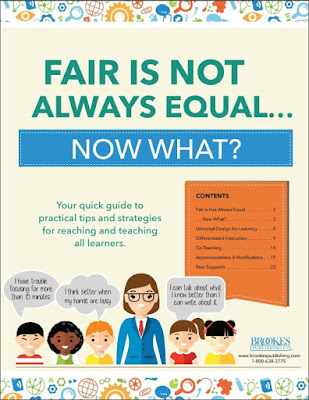
Several weeks ago I shared the Fair Is Not Always Equal infographic created by the Inclusion Lab from Brookes Publishing. The post (as well as the 25 subsequent resources available in the F.I.N.A.E. series) drew tremendous popularity on social media, so it seemed fitting to share the latest eBook that was developed. 

http://www.brookespublishing.com/campaigns/fair-not-equal/?utm_source=blog&utm_medium=post&utm_campaign=fair-is-not-always-equalThe eBook includes ready-to-use tips on hot topics like planning UDL lessons, strengthening co-teaching partnerships, teaching to multiple intelligences, maximizing student engagement, and using accommodations and modifications from some of today’s top experts on UDL, co-teaching, and inclusive education, including Loui Lord Nelson, Nicole Eredics, Elizabeth Stein, and Kathleen McClaskey. Additionally, the eBook shares the success stories of educators who’ve been there, done that, and made inclusion and differentiation work in their own classrooms.

The ultimate goal of the resource is to provide helpful hints, strategies and visual infographic at your fingertips for integration into your classrooms.

Click the link or image above to download the free, full-color eBook that excerpts the best posts from the Fair Is Not Always Equal…Now What? series in one convenient place. Keep it as a valuable inclusion resource, and please share it around with anyone interested in the nuts and bolts of meeting every learner’s needs.

Source: The Inclusion Lab from Brookes Publishing

Wednesday, September 28, 2016

Universal Design for Learning at a Glance

The following article was written by Paul Vincent, a writer for the blog Technology Enhanced Learning.  His article clearly reiterates what is the Universal Design for Learning (UDL) and why it is so important in classrooms around the world today. The video featured in the article was created by the CAST organization, experts in UDL. If you have not done so already, sign up on CAST's UDL website to access the valuable UDL resources available.
Use of technology to enhance learning, teaching and assessment should be considered and appropriate, and should never exclude any learner from engaging in the process. The burden of inclusivity lies with all staff, by curriculum design, and it should not be left to students to adapt.
Universal Design for Learning (UDL) is an educational framework based on research in the learning sciences, including cognitive neuroscience, that guides the development of flexible learning environments that can accommodate individual learning differences. (Rose & Meyer, 2002)
UDL is a set of principles for curriculum development that give all individuals equal opportunities to learn. It provides a blueprint for creating instructional goals, methods, materials, and assessments that work for everyone – not just a single, one-size-fits-all solution but rather flexible approaches that can be customised and adjusted for individual needs.

UDL at a Glance

Three primary principles, which are based on neuroscience research, guide UDL and provide the underlying framework for the Guidelines:
  • Principle I: Provide Multiple Means of Representation (the ‘what’ of learning). Learners differ in the ways that they perceive and comprehend information that is presented to them.
  • Principle II: Provide Multiple Means of Action and Expression (the ‘how’ of learning). Learners differ in the ways that they can navigate a learning environment and express what they know.
  • Principle III: Provide Multiple Means of Engagement (the ‘why’ of learning). Affect represents a crucial element to learning, and learners differ markedly in the ways in which they can be engaged or motivated to learn.
Click  here for a printable version
 UDL Guidelines – Version 2.0: Download the UDL Guidelines [Word]: A complete narrative describing the context within which CAST developed the UDL Guidelines including explanations and examples of each principle and checkpoint.

UDL and Technology
Good educators will always find ways to design curricula that meets the needs of all learners, whether they are using technology or not. However, considered and appropriate digital technologies applied using UDL principles can enable easier and more effective customisation of curricula for learners. Advances in technology have made “on-the-fly” individualisation of curricula possible in practical, cost-effective ways, and many of these technologies have built in supports, scaffolds, and challenges to help learners understand, navigate, and engage with the learning environment.
Learning and demonstrating effective uses of technology is itself an important instructional outcome. Digital Capabilities can be defined as the skills and/or competencies required for living, learning and working in a digital society. Even today’s students need support with some areas of digital capability, particularly in an academic context, so it’s important to make sure that these needs are met.
However, it is important to note that these technologies should not be considered to be the only way to implement UDL. The goal of UDL is to create environments in which everyone will have the opportunity to become expert learners, and the means to get there, be it tech or non-tech, should be flexible.
It is also important to point out that simply using technology in the classroom should not be considered implementation of UDL. Using technology does not necessarily enhance learning, and many technologies have the same accessibility problems that non-tech options might have. Technology needs to be carefully planned into the curriculum as a way to achieve the goals. The Technology Enhanced Learning (TEL) Handbook 2015-18 is designed to guide staff in the considered and appropriate application of technology to enhance student engagement in learning, teaching, and assessment at York St John (YSJ).
In short, technology is not synonymous with UDL, but it can play a valuable role in its implementation and conceptualisation.
More information about UDL can be found at http://www.udlcenter.org/
Through engagement with inclusivity and accessibility issues, and active consideration of what and how you use technology to facilitate learning and teaching, you will be aligning your practice to the UK Professional Standards Framework (UKPSF). In particular the Professional Values and dimensions V1: Respect individual learners and diverse learning communities and V2: Promote participation in higher education and equality of opportunity for learners.
Download an Educators Worksheet for the UDL Guidelines [Word]: A worksheet listing the UDL principles and checkpoints with space for note-taking.


References
CAST (2011). Universal Design for Learning Guidelines version 2.0. Wakefield, MA: Author.
Rose, DH, & Meyer, A (2002) Teaching Every Student in the Digital Age: Universal Design for Learning. Alexandria, VA: ASCD.

Tuesday, September 27, 2016

Understanding the Importance of UDL

 Today's blog post's focus is on Universal Design Learning (UDL), which plays an incredibly important role in determining the appropriateness of assistive technology and ensuring it meets the needs of the individual. Even if you are new to understanding UDL, you've most likely seen it displayed throughout your life (predictive text on your smartphone) or within your own classroom (e-books).  The infographic below and the Q&A for Educators article written by National Center On Universal Design for Learning are helpful in clearly explaining not only what it is, but also the importance of successfully implementing it with all students, not just those with disabilities.
"It’s about building in flexibility that can be adjusted for every student’s strengths and needs." -Amanda Morin, writer for Understood.org

Universal Design Learning is a framework for learning that includes all students. Being grounded in socio-cultural theory, UDL views learning environments and social interactions as being key elements in development and learning. In UDL students are allowed to express their learning in a variety of ways. As stated above, the key principles driving UDL include flexibility, simple and intuitive instruction, multiple means of presentation, success oriented curriculum, appropriate level of student effort, and appropriate environment for learning.
Below is a handy visual from TIC that sheds more light on the principle of Universal Design Learning and provides some resources to help teachers integrate UDL in their classroom.

What Is UDL and How Can You Make It Work in Your Classroom?


You’ve probably been differentiating instruction for your students in one way or another since you started teaching, so you may be wondering, “What’s all the buzz about universal design for learning (UDL)?” Sure, planning all your lessons to cater to every student’s individual learning style is ideal, but realistically, how can you make UDL work in a classroom of 30 or more students? 


Here are six steps, adapted from Your UDL Lesson Planner by Patti Kelly Ralabate, to make UDL lesson planning work in your classroom and give all students an equal opportunity to learn.


STEP 1: Ready. Set. Goal!
First, ask yourself, “What’s the goal of this lesson?” (Hint: Many times Common Core or state standards help you figure it out.) Even though the standards may be a starting point, the learning goals should focus on your students—specifically their knowledge, skills and perceptions. Try to make goals SMART: specific, measurable, attainable, results-oriented and time bound. It sounds like a lot of work, but taking time up front to make sure goals are solid, makes everything else easier.


STEP 2: Think through individual differences.
Before you dive into teaching your lesson, take a few minutes to think about variability in your students—any individual differences in their current skills, learning gaps and needs. Do you have a student who gets easily distracted or may feel frustrated for some reason? Think about what types of scaffolding (e.g., pre-teaching vocabulary) you can use to set up your students for success.


STEP 3: Decide how you’ll check that students are “getting it.”
Think about how you’ll check your students’ understanding throughout the lesson to make sure they’re meeting the goals you set. Besides helping you know if your students are “getting it,” informal checks can also help you see whether you’re teaching too fast or slow or if the information is clear. If you have students who are on an IEP or 504 plan, find out if they have any assessment accommodations you need to provide.


STEP 4: Pick and choose materials and methods wisely.
To make learning motivating and memorable, ask yourself questions like, “Are these math manipulatives distracting or will they actually help my students learn?” This is also a good time to think back to your students’ individual differences and plan accommodations or modifications, like using different colored markers on the whiteboard or allowing a student more time to finish an activity.


STEP 5: It’s time to teach!
Now it’s time to pull it all together and deliver your awesome UDL lesson. Throughout your teaching, try to use a flexible approach to check your students’ understanding and make sure they meet the learning goals you set.


STEP 6: Hold a mirror up to your lesson.
After your lesson is over, take time to think about how it turned out. What worked well? What will you do differently next time? Did all your students achieve the learning goals you set? What’s next?
 

How does UDL lesson planning look in real classrooms? Visit the Brookes Inclusion Lab to see how three teachers with very different needs use these six steps in their lesson planning.


Click on the link to access the original article by Jen Lillis on the We Are Teachers website (sponsored by Brookes Publishing)