
 This Friday "Appy" Hour features the Apple exclusive app, Clips. If you follow any of the EdTech or Assistive Technology hashtags on Twitter, then at some point you have seen a post or mention regarding Clips and it's expansive features. So what's all the hype about?
Clips is a free app, which allows you to customize photos and videos before sharing them with friends and family. Within the app users can create and send video messages or narrate a story with the help of artistic filters, animated text, music, emojis, and fun stickers featuring characters.
Some highlighted features of Clips...
 Videos made easy
• create videos in real time with simple controls — no timeline, tracks, or complicated editing tools
• Record video, take photos, or add them from your library
• Easily mute audio, adjust the length of your clips, and reorder them
• Drag and pinch while recording to add smooth pan and zoom animations to your photos and videos
• Add a music track from your library or choose from more than 60 built-in soundtracks that automatically adjust to the length of your video
• Record video, take photos, or add them from your library
• Easily mute audio, adjust the length of your clips, and reorder them
• Drag and pinch while recording to add smooth pan and zoom animations to your photos and videos
• Add a music track from your library or choose from more than 60 built-in soundtracks that automatically adjust to the length of your video
Artistic effects and filters
• Turn any photo or video into a moody painting, elegant pencil sketch, or comic book illustration*
• Add warmth, impact, or drama to videos and photos with a selection of filters from the Camera app
• Use effects and filters while recording or apply them to photos and videos from your library
Live Titles

Fun stickers, emoji, and posters
• Add warmth, impact, or drama to videos and photos with a selection of filters from the Camera app
• Use effects and filters while recording or apply them to photos and videos from your library

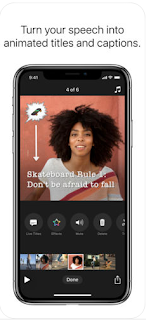
Live Titles
• Create animated titles and captions using just your voice
• Captions are generated automatically as you speak and match the timing of your voiceover
• Easily change the style of your title, adjust text and punctuation, or add inline emoji
• Captions are generated automatically as you speak and match the timing of your voiceover
• Easily change the style of your title, adjust text and punctuation, or add inline emoji

• Choose from dozens of animated stickers from Star Wars, Disney, and Pixar
• Add emoji, animated speech bubbles, shapes, and customizable text labels to your photos and video clips
• Use full-screen posters with animated backgrounds and customizable text to help tell your story
• Add emoji, animated speech bubbles, shapes, and customizable text labels to your photos and video clips
• Use full-screen posters with animated backgrounds and customizable text to help tell your story
Interested in seeing Clips in action and how to connect this into the classroom? Watch the brief video created by Apple Distinguished Educator, Kristen Brooks, which provides a visual demonstration to highlight the ease of the app and built-in features.
Looking for more ideas? Read the ICT Evangelist article:


 Stephen Hawking said "the future is indefinite and exists only as a spectrum of possibilities." But what are those possibilities, you ask? Well, as technology becomes more ubiquitous and readily available for everyone to purchase, we will explore some of the current and future general technology application trends that could be considered assistive technology. Some technologies to consider are wearables, digital assistants (smart speakers) and even the worlds of Virtual and Augmented Reality.


 Most of us know about many of the most common technologies to help students with disabilities. This presentation will explore creative technology to help struggling learners better access the curriculum and engage in the learning process. You will learn about how to include students in art, and music with technology and engage students with various disabilities. Participants will learn about high-interest technologies that will motivate student and the psychology of educational technology. If you are looking for something new and different, this presentation is for you.
 John F. O’Sullivan is a Librarian, an Assistive Technology Specialist and an author of several books on educational technology. His books include The Educational Technology Guide 2018, The UDL Educational Technology Guide 2018, UDL Technology, The Teacher’s Awesome App Guide, and Teaching Projects with Computers. He currently holds four certifications in education and has taught under each certification. He works for Chelmsford Public Schools at Chelmsford High School. He has worked in the past as a Special Education Teacher and Technology Integration Specialist.




