Pages

Wednesday, January 10, 2018

Dyslexia Fact Sheet


Looking for more information....

Source: Understood.org

Tuesday, January 9, 2018

A Must Read: The New Assistive Tech: Make Learning Awesome For All! by Chris Bugaj


In keeping with my resolution of bettering myself both personally and professionally, I've made a promise to read more this year, and the book, The New Assistive Tech: Make Learning Awesome for All! by Chris R. Bugaj sits at the top of my books to read.


My previous post, The Practical (and Fun) Guide to Assistive Technology in Public Schools: Building or Improving Your District's AT Team, highlighted Bugaj's other book and is another must-read if you haven't delved in already. Be sure to click the link above for more information. 


The New Assistive Tech is a catalyst for breaking down walls between special education and general education, and with the desire to support educators in realizing they possess and can build upon the technical knowledge which can be used to support students with disabilities. Bugaj shifts the focus also onto school districts who often struggle to develop consistent practices for meeting the assistive needs of special education students. Strategies and information presented in this book will help public school educators select, acquire and implement technology to help all students, with particular emphasis on those with special needs.
Book highlights include:
  • Details how an educational team can request assistance to determine technology needs.
  • Explains how to conduct and document assessments to help an educational team make informed decisions about technology needs.
  • Describes a proactive approach to professional development for individuals and for those who train others on the use of technology.
  • Assists individuals or teams in creating an action plan for developing a culture of inclusion.
  • Interweaves stories, songs and other exciting features to make learning fun!

About the Author

Chris Bugaj is a founding member of the Assistive Technology
Team for Loudoun County Public Schools in Ashburn, Virginia, and co‐author of The Practical (and Fun) Guide to Assistive Technology in Public Schools (ISTE). He hosts the award-winning podcast A.T.TIPSCAST; has presented over 200 sessions at local, national and international events; and has designed and instructed online courses on assistive technology.


Cost
The book can be pre-ordered through the ISTE website
ISTE members pay $26.22 and non-ISTE members pay $34.95
Be sure to get your hands on a copy today! 

Monday, January 8, 2018

Motivational Monday


Thursday, January 4, 2018

ISTE's List of 14 Edu Books Worth Reading

14 edu-books worth reading

The new year is upon us and for many in the education field, we are often seeking ways to enhance our professional practice. If you’re one of those looking for inspiration or ideas in an education-themed book then look no further! ISTE members were polled to share their favorite edu-reads. The list created contains books that cover a wide array of topics, and there really is something for everyone. Be sure to read the full article written and compiled by Jennifer Snelling to get a complete description and explanation behind each of the titles suggested below: 
1. Courageous Edventures by Jennie Magiera 
3. Equity 101: The Equity Framework by Curtis W. Linton 
8. Qualities of an Effective Teacher by James H. Strong 
9. Start With Why by Simon Sinek
10. Teach Like a Pirate by Dave Burgess
11. Technology and Problem-Based Learning by Lorna Uden and Chris Beaumont

Source: ISTE

Wednesday, January 3, 2018

9 Strengths of a Dyslexic by Nessy

When you think of the term dyslexia, do you view it as a weakness? a disability? a disadvantage compared to others? Often times, dyslexia is viewed negatively, with the emphasis on what the dyslexic individual cannot do. However, the mind of a dyslexic individual possesses many strengths too. The following list compiled by the team at Nessy highlights 9 strengths of a dyslexic.

Be sure to also check out these previous posts featuring resources designed and shared by Nessy: 


1. Seeing the bigger picture

People with dyslexia often see things more holistically.
They miss the trees but see the forest.
“It’s as if people with dyslexia tend to use a wide-angle lens to take in the world,
while others tend to use a telephoto, each is best at revealing different kinds of detail.”
Matthew H. Schneps, Harvard University

2. Finding the odd one out

People with dyslexia excel at global visual processing and the detection of impossible figures. Scientist Christopher Tonkin, described his unusual sensitivity to “things out of place.” Scientists in his line of work must make sense of enormous quantities of visual data and accurately find black hole anomalies.
Finding the odd one out
There are so many people with dyslexia in the field of astrophysics that it prompted research at the Harvard-Smithsonian Center for Astrophysics. Findings confirmed that those with dyslexia are better at identifying and memorizing complex images.

3. Improved pattern recognition

People with dyslexia have the ability to see how things connect to form complex systems, and to identify similarities among multiple things. Such strengths are likely to be of particular significance for fields like science and mathematics, where visual representations are key.

“I recognized that I had dyslexia and then I realized I had this gift for imaging. I live in a world of patterns and images, and I see things that no one else sees. Because of dyslexia, I can see these patterns.”
“You can’t overcome it (dyslexia); you can work around it and make it work for you, but it never goes away. That’s probably a good thing, because if dyslexia went away, then the other gifts would go away too.”
Beryl Benacerraf, M.D., Physician. World-renowned radiologist and expert in ultrasound.

4. Good spatial knowledge

Many people with dyslexia demonstrate better skills at manipulating 3D objects in their mind. Many of the world’s top architects and fashion designers have dyslexia.
Good spatial knowledge

“I was called stupid. Not only could I not read, but I couldn’t memorize my school work. I was always at the bottom of the class. I became very depressed.”
Richard Rogers
“I performed poorly at school – when I attended, that is – and was perceived as stupid because of my dyslexia. I still have trouble reading. I have to concentrate very hard at going left to right, left to right, otherwise my eye just wanders to the bottom of the page.”
Tommy Hilfiger

5. Picture Thinkers

People with dyslexia tend to think in pictures rather than words. Research at the University of California has demonstrated children with dyslexia have enhanced picture recognition memory.
Nineteenth-century French sculptor, Auguste Rodin, could stare at paintings in museums by day and paint them from memory at night. His dyslexia meant he could barely read or write by the age of 14, with his reading skills developing much later.

6. Sharper peripheral vision

People with dyslexia have better peripheral vision than most, meaning they can quickly take in a whole scene. Although it can be hard to focus in on individual words, dyslexia seems to make it easier to see outer edges.
Sharper peripheral vision
James Howard Jr., a professor of psychology at the Catholic University of America, described in the journal Neuropsychologia an experiment in which participants were asked to pick out the letter T from a sea of letter L’s floating on a computer screen. Those with dyslexia identified the letter more quickly.

7. Business entrepreneurs

Did you know that one in three American entrepreneurs have dyslexia?
Entrepreneurs like Thomas Edison, Henry Ford, Steve Jobs and Charles Schwab all had dyslexia. Perhaps better strategic and creative thinking could provide a real business advantage.
“I seemed to think in a different way from my classmates. I was very focused on trying to set up a business and create something. My dyslexia guided the way we communicated with customers.”
Richard Branson

8. Highly creative

Many of the world’s most creative actors have dyslexia, such as Johnny Depp, Keira Knighltly and Orlando Bloom.
“Many of the super creative designers I have worked with seemed
to have one thing in common; they suffered from dyslexia.”
Soren Petersen, Design Research PH.d
 
Pablo Picasso (Artist)
Picasso was described by his teachers as “having difficulty differentiating the orientation of letters”. Picasso painted his subjects as he saw them – sometimes out of order, backwards or upside down. His paintings demonstrated the power of his imagination, which was perhaps linked to his the inability to see written words properly.
 

9. Thinking outside the box – problem solving


Those with dyslexia are well known for having sudden leaps of insight that solve problems with an unorthodox approach.
This is an intuitive approach to problem solving that can seem like daydreaming. Staring out of the window is how they work, letting their brain slide into neutral and ease itself around a problem to let connections assemble.

Tuesday, January 2, 2018

Digital Does Not Equal Accessible!

Digital Does Not Equal Accessible is an article written by Hillary Goldwaith-Fowles, PhD, ATP, which focuses on an important area of discussion that arises in the field of assistive technology. It is often a misconception that because materials are presented digitally this would also imply that they are accessible for those who need materials to be presented in such a way. With the help of her Twitter PLN, Dr. Fowles helps to break down how digital does not always equate to accessible, and how we as professionals, parents and even students can help to ensure that materials are accessible to those who require them to be. Read the article featured below or click here to access Hillary's website to read this article and others she has shared. 


Interested in learning more? Be sure to grab a copy of Hillary's book One Size Does Not Fit All: Equity, Access, PD and UDL


We’ve recently refreshed the copiers in our district. You’d think this wasn’t a big deal, however, the ability to scan in color is pretty exciting (I know, it doesn’t take much to bring joy to my world)!  This opens up a whole new level of possibility for teachers who, with the best of intentions, want to ensure that students have access to content on a tablet or laptop.
This is a great idea.  Paperless classrooms are now a “thing”, and that’s great for the trees and the environment! Simply scanning documents into a copier and posting them in Google Classroom DOES make them digital. It DOES lend itself to a paperless classroom. However, what it does NOT do is make that media ACCESSIBLE.
What does accessible mean? When we are talking about content that is on a computer phone, or tablet, we mean that ANY user can use tools to access the content (i.e. screen reader, text to speech, magnification software, etc).  The content literally comes to life for a user with (or without) disabilities.
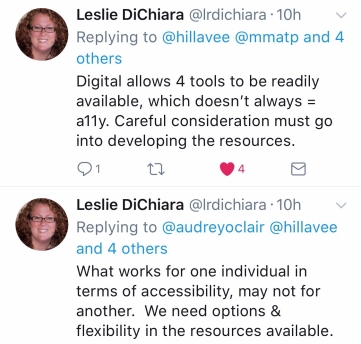
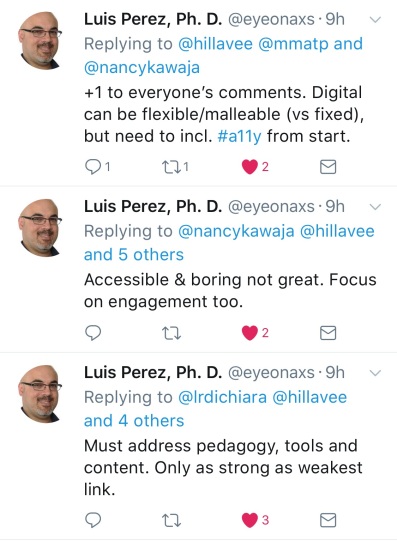
I posed this question a while ago on “the Twitter”, as I know I’m not the first person to talk about this concept, or face this dilemma in their setting.  In reaching out to my PLN (Professional Learning Network, I received some wonderful responses! Here’s what they had to say when I posted the graphic “Digital does not Equal Accessible” and asked for their thoughts.
Nancy4thewin
In other words- ALL means ALL.

leslieaudrey
In other words, intentional use, with end user (i.e. students) as focus.

audreymikeuse
In other words, don’t be afraid to explore and allow students to explore as well! 
leslie
In other words- Dear Developers, please listen to us as you continue to develop tools to support ALL  learners.

MikeMarotta
There are no other words here- this about sums up this whole blog  post! 

Luis Perez
In other words, forethought, not afterthought. 

cheryloakes.jpg
In other words, leverage UDL.
I also took the time to email John Brandt  from MaineCite and Cynthia Curry from CAST and the National Center on Accessible Educational Materials (AEM Center) on the subject, as their primary roles in their work center around accessibility.
John graciously shared some resources, which help in building understanding around accessibility as a forethought, not an afterthought:
Cynthia Curry, in the most eloquent of ways, summed up how to think about accessibility rather nicely:
“Materials can be born print and require retrofitting
Materials can be born digital but difficult or impossible to retrofit
Materials can be born accessible and thereby readily usable”
I hope this post and resources are helpful to you in developing deeper understanding of accessibility. Many thanks to  John Brandt,  Cynthia Curry, Leslie DiChiara, Nancy Kawaja, Mike Marotta, Cheryl Oakes, Audrey O’Clair, and Luis Perez for their time, expertise, and invaluable contributions.
” Do the best you can until you know better. Then when you know better, do better”
– Maya Angelou*.
*Cynthia Curry used this quote in a presentation at ACTEM in October. I love it.

Permission to share this article directly on the Where It's AT blog was granted by the author of the article. 

Monday, January 1, 2018

Welcome 2018!!!!

Welcome 2018! 
Here's to a year filled with doing our best!